

AI Observability
AI Observability (/ai-observability, under Analyze in the sidebar, marked
Beta) shows the calls your applications make to large language models (LLMs),
such as OpenAI, Anthropic or Gemini models, and to the tools and agents built on
them: what they cost, how many tokens they use, how fast they answer and how often
they fail. It has four tabs: Overview, Explorer, Model pricing and
Attribute Mapping.
Use this page when your LLM bill grows and you want to know which model or service spends it, when an AI feature feels slow, or when you want to follow one agent run through every model and tool call it made.
LLM calls in plain words
Section titled “LLM calls in plain words”- Tokens are the pieces of text a model reads and writes; a token is roughly three quarters of an English word. Providers charge per million tokens, with input (prompt) tokens cheaper than output (response) tokens.
- Cached tokens: many providers reuse a prompt prefix they have seen recently and charge less for it (cache read), sometimes more for storing it (cache write). The prompt cache hit ratio says how much of your input came from the cache.
- Cost is tokens × price. FuseScope computes it for each call from the token counts on the span and the price you set under Model pricing.
- Latency is how long a call took in total. TTFT (time to first token) is how long until the first words arrived; with streaming, that is what a user waits for before text starts to appear.
- An agent is code that lets a model decide which tools (functions) to call, in a loop, to finish a task. One agent run is one trace with several LLM and tool calls.
FuseScope reads all this from spans that follow the OpenTelemetry GenAI semantic
conventions: gen_ai.request.model, gen_ai.provider.name,
gen_ai.usage.input_tokens, gen_ai.usage.output_tokens and, for tools and agents,
gen_ai.tool.name and gen_ai.agent.name. See
LLM tokens and
TTFT.
Get started
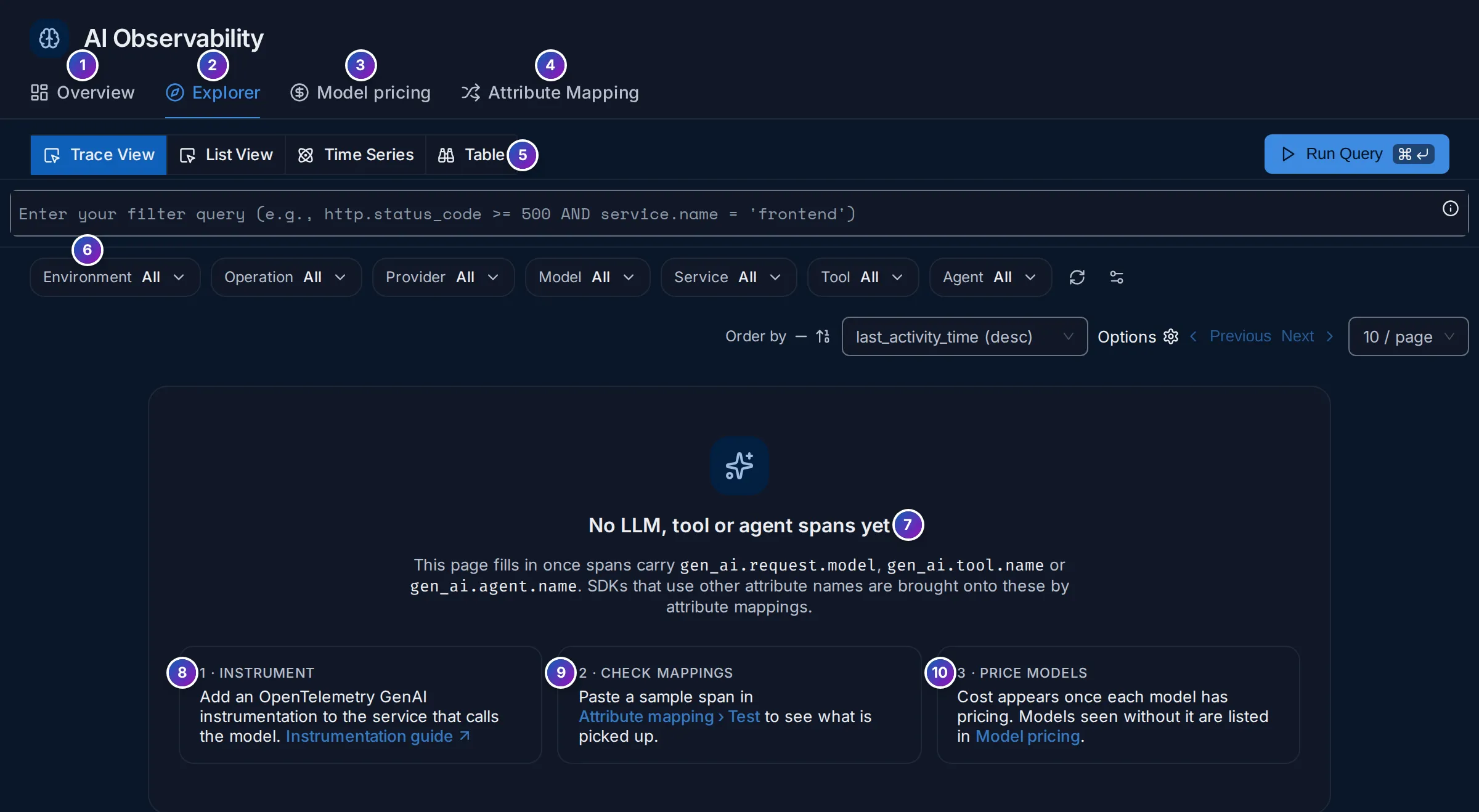
Section titled “Get started”Until spans with GenAI attributes arrive, the Explorer shows what to do:
-
Instrument (8): add an OpenTelemetry GenAI instrumentation to the service that calls the model, such as the OpenAI, Anthropic, Bedrock, LangChain or LlamaIndex instrumentations for Python and Node.js, or OpenLIT, which covers many of them and also reports TTFT. They export to FuseScope over OTLP like any other span; see Instrument applications.
-
Check mappings (9): if your library writes other attribute names, such as
llm.model_nameinstead ofgen_ai.request.model, attribute mappings translate them. Paste a sample span in Attribute Mapping › Test to see what is picked up. -
Price models (10): cost appears once each model has a price. See Model pricing.
The Overview shows 0 and No data in this time range in the meantime.
Overview
Section titled “Overview”Overview is a ready-made dashboard over your LLM, tool and agent spans.
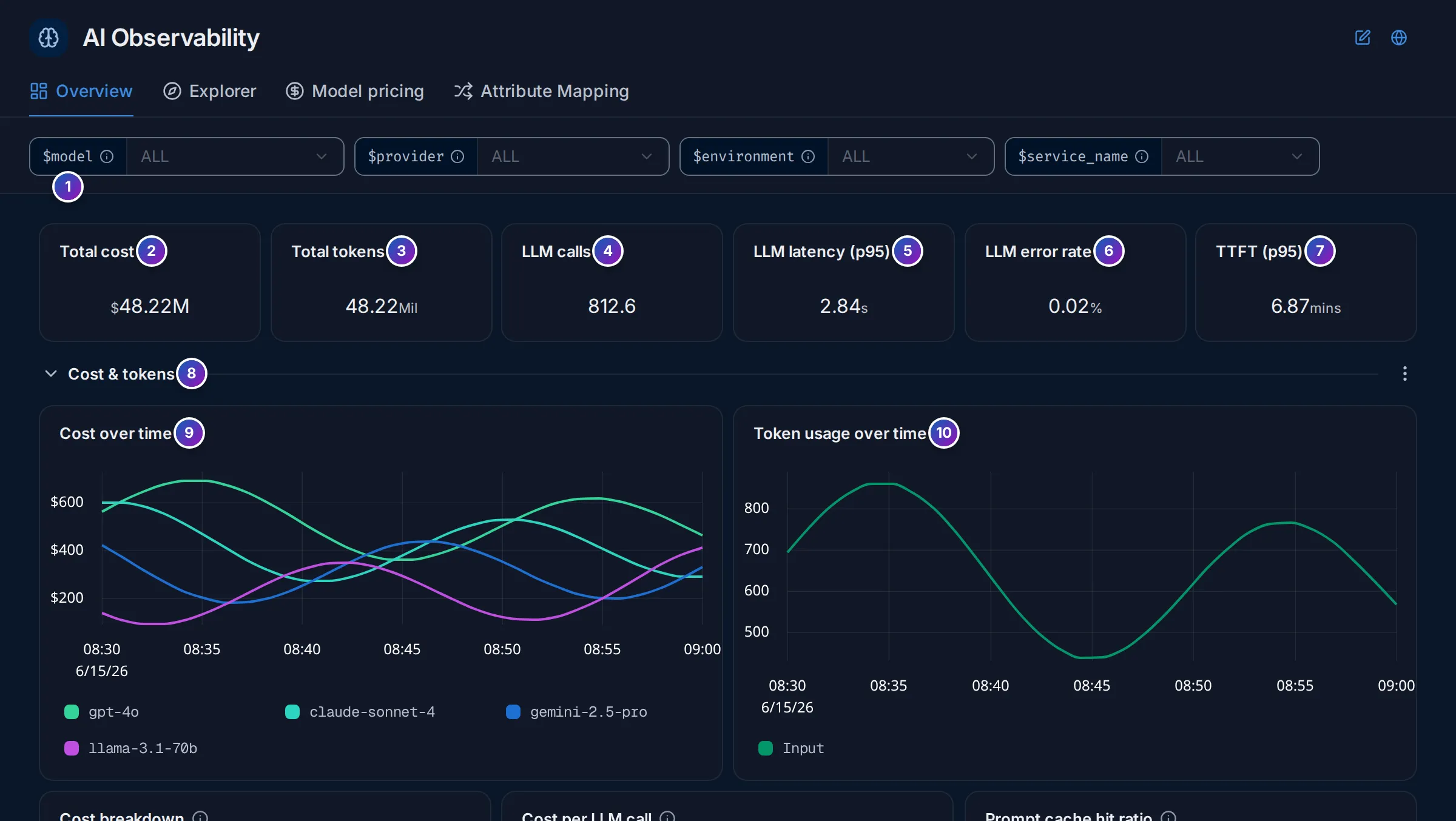
Sample data: this image is a Storybook story, not the demo.
- Variables:
$model,$provider,$environmentand$service_namenarrow every panel, like dashboard variables. - to 7. KPIs: Total cost, Total tokens (input plus output), LLM calls
(spans with
gen_ai.request.model), LLM latency (p95), LLM error rate and TTFT (p95). TTFT readsgen_ai.server.ttft, in seconds. From the release after v0.153.0, attribute mapping fills it fromgen_ai.server.time_to_first_token(OpenLIT) andgen_ai.response.time_to_first_chunk(OpenTelemetry conventions); on older versions, map those keys onto it yourself. - Sections you can fold:
| Section | Panels |
|---|---|
| Cost & tokens | Cost over time by model, token usage over time, cost breakdown (input, output, cache read, cache write), cost per LLM call, prompt cache hit ratio, cost by service, cost by provider |
| Per-trace usage | AI traces over time, calls per AI trace, cost per AI trace, tokens per AI trace |
| LLM latency & errors | Latency by model, latency over time, slowest LLM call per trace, time to first token, errors over time, error rate by model, finish reasons |
| Tool calls | Tool call rate, tool error rate, tool duration, top tools, top span names |
Finish reasons counts why each response ended; a growing share of length or
max_tokens means answers are cut off.
Explorer
Section titled “Explorer”Explorer searches LLM, tool and agent spans, with the same tools as the Traces explorer.
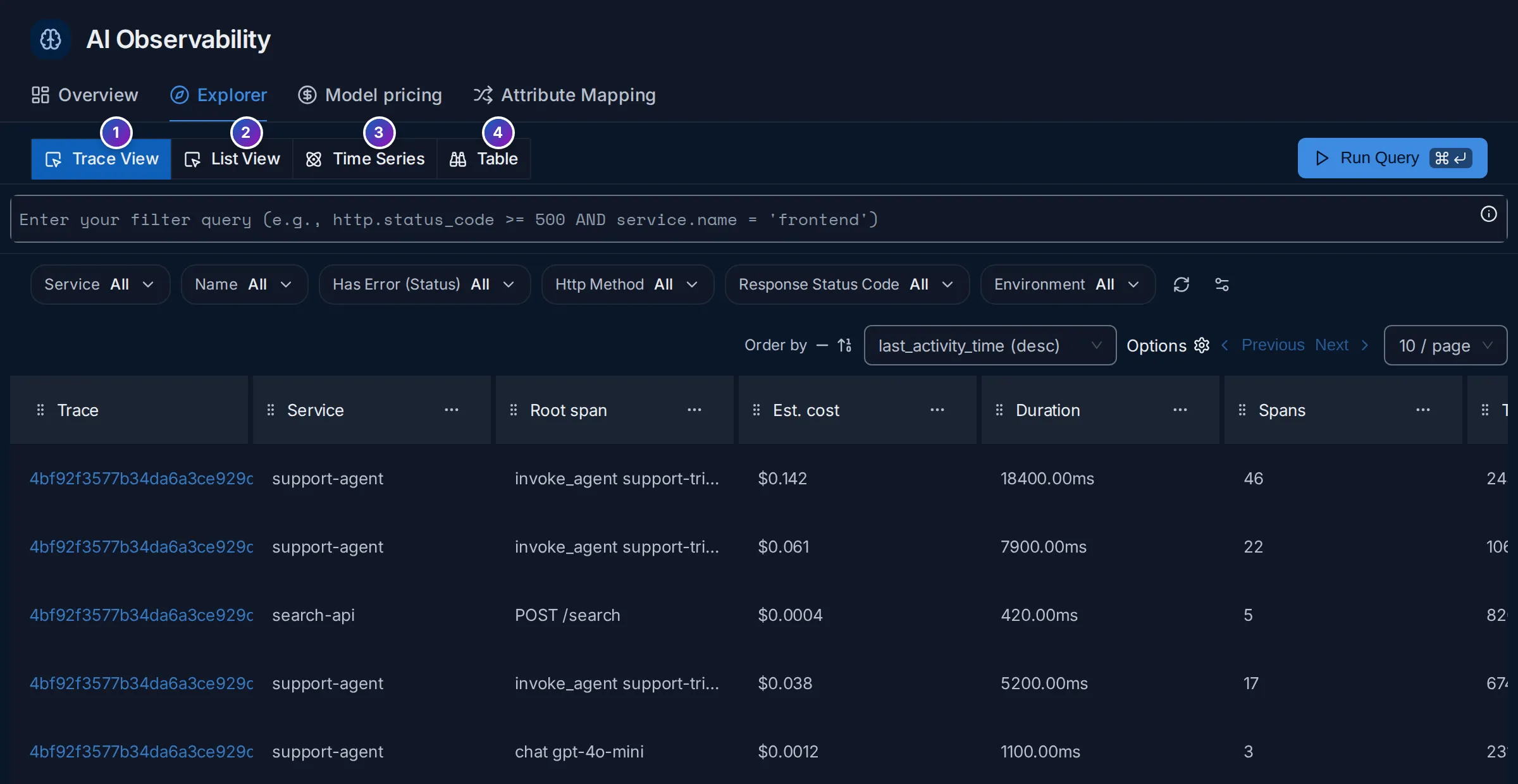
Sample data: this image is a Storybook story, not the demo.
- Trace View: one row per trace that has LLM, tool or agent activity, with Est. cost, Duration, Spans, Tokens and Tokens in / out, Distinct tools, LLM calls, Tool calls, Errors, the first Input and last Output, and the Slowest LLM call. Click a trace ID to open it in Trace details.
- List View: one row per span.
- Time Series: a chart of any aggregation, such as cost per model.
- Table: aggregated numbers grouped by attributes.
The quick filters above the list (Environment, Operation, Provider,
Model, Service, Tool, Agent) narrow it with one click. From the release
after v0.153.0, Environment reads deployment.environment.name, and
Environment (legacy) reads deployment.environment for older SDKs.
Model pricing
Section titled “Model pricing”Model pricing holds the price of each model, in US dollars per million tokens.
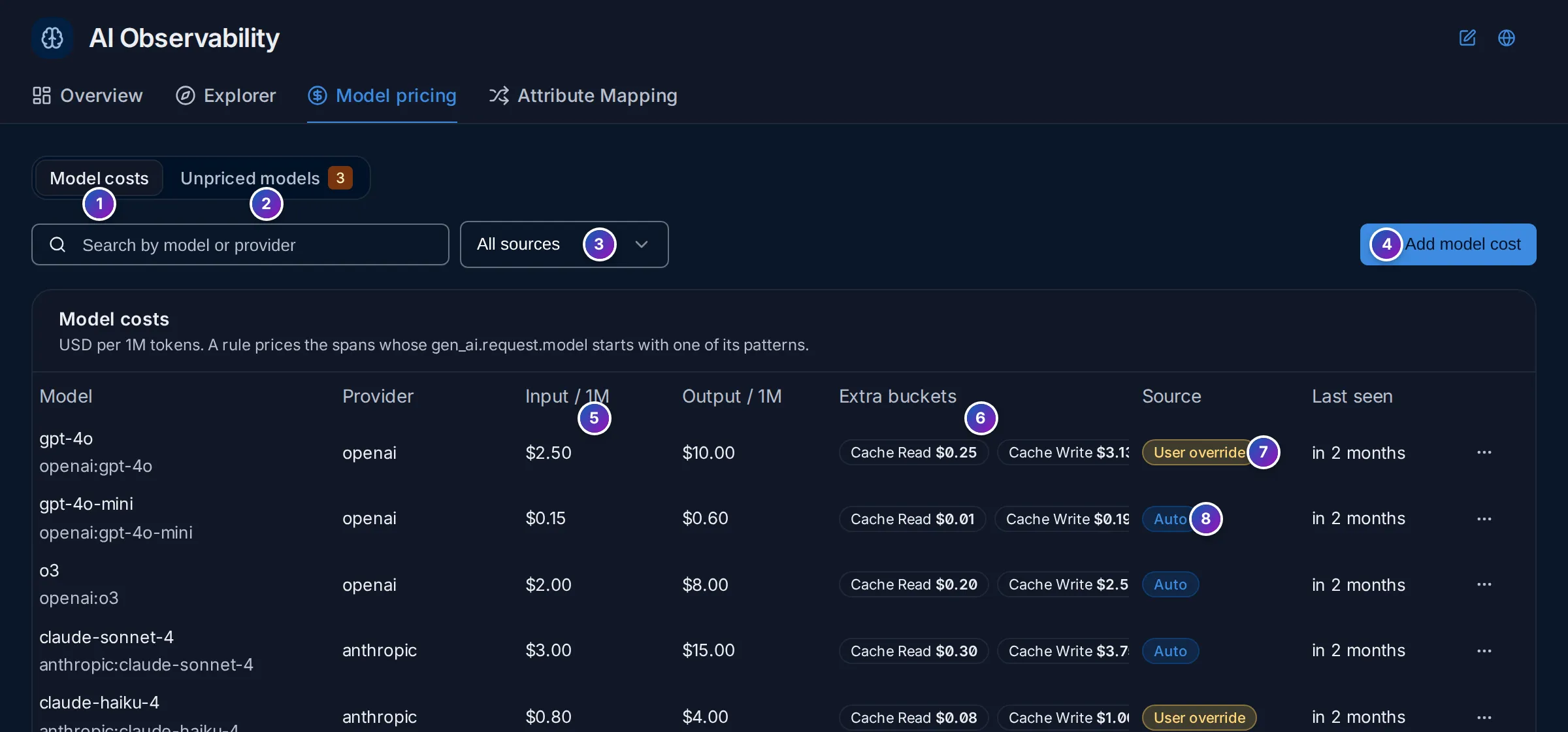
Sample data: this image is a Storybook story, not the demo.
- Model costs: one row per pricing rule, with its Provider, Input / 1M and Output / 1M prices (5), Extra buckets such as cache read and cache write (6), its Source and when a matching model was Last seen.
- Unpriced models: models seen in your spans that no rule prices. Their cost is
0until you price them. Map to billing model points one at an existing rule, for example a dated model version at the rule of its family. - All sources, User override or Auto filters the list.
- Add model cost creates a rule.
- User override: a price you set. It takes precedence.
- Auto: a default price FuseScope ships.
A rule prices every span whose gen_ai.request.model starts with one of its
patterns: a rule for gpt-4o also prices gpt-4o-2024-08-06. Click ⋯ on a row
to edit it:
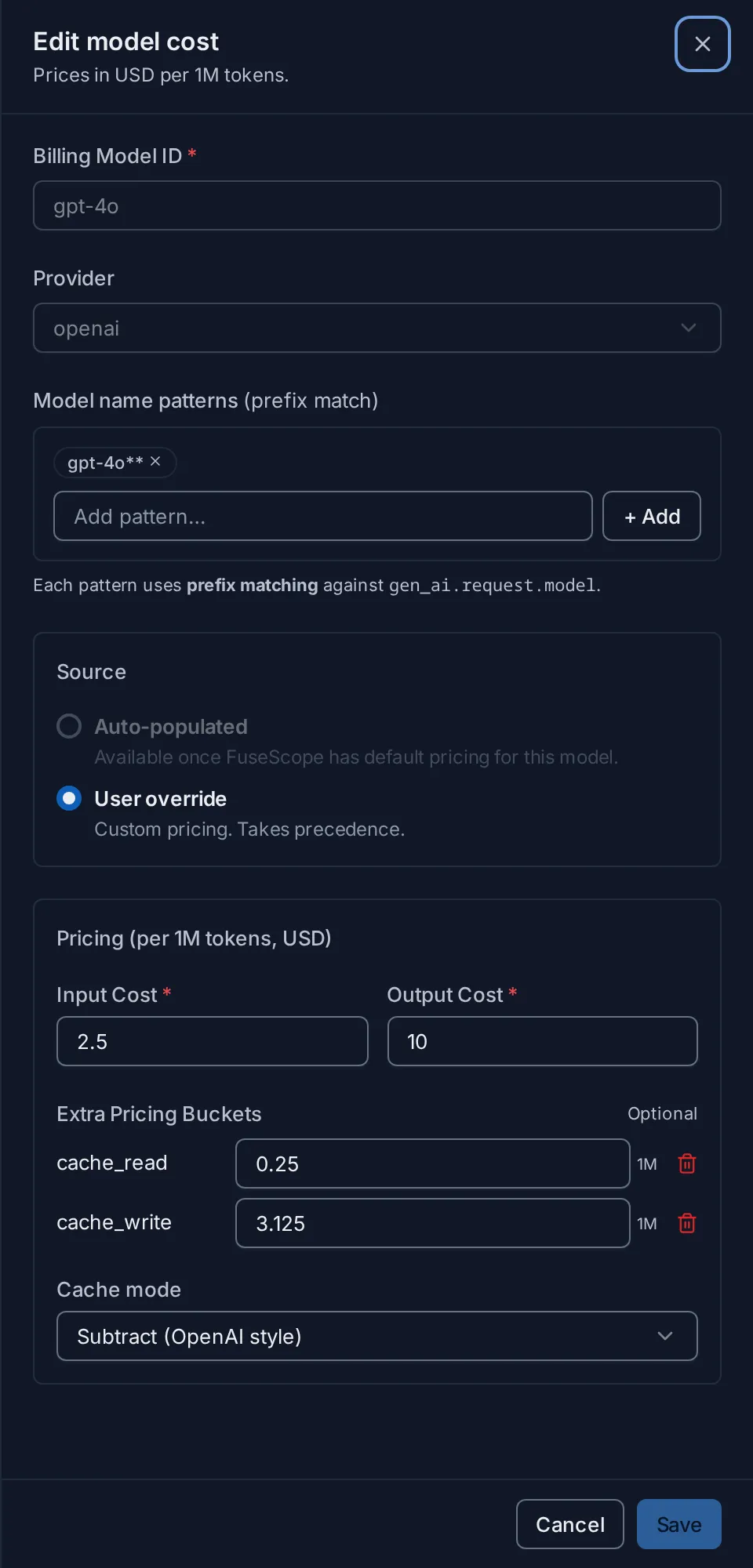
Sample data: this image is a Storybook story, not the demo.
Cache mode tells FuseScope how the provider counts cached tokens:
| Cache mode | Meaning |
|---|---|
| Subtract (OpenAI style) | Cached tokens are already included in the input tokens; they are priced at the cache rate and taken out of the input count |
| Additive (Anthropic style) | Cached tokens are reported separately from the input tokens and priced on top |
Pricing is applied by the FuseScope collector as spans arrive: it writes the cost of
each call to signoz.gen_ai.usage.tokens.cost (and one attribute per bucket), which
the Overview and Explorer read. A new price applies to new spans only. Creating, changing and
deleting rules needs the Admin
role.
Attribute mapping
Section titled “Attribute mapping”Not every library uses the GenAI attribute names. Attribute Mapping copies the attributes it finds onto the standard names, in the collector, before the spans are stored.
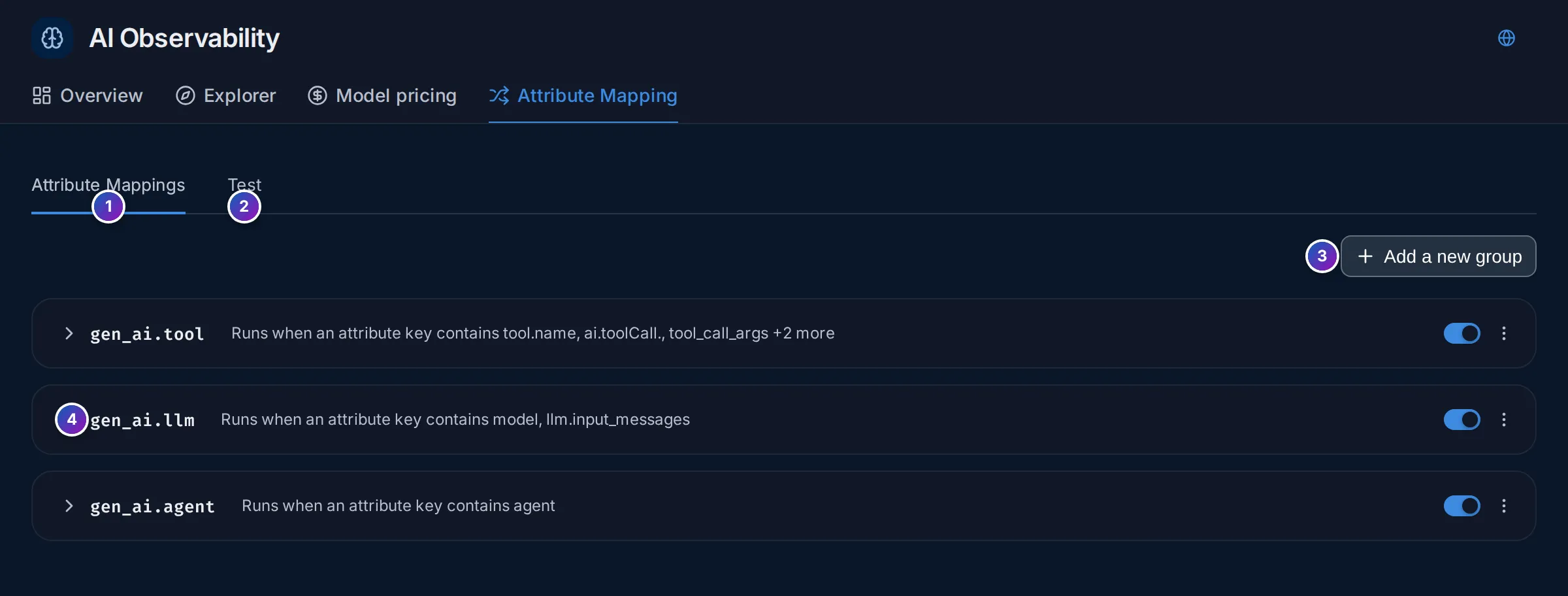
- Attribute Mappings: the mapping groups. FuseScope ships three,
gen_ai.tool,gen_ai.llmandgen_ai.agent. - Test: paste a sample span as JSON and click Run Test to see which standard attributes get filled in, and from which of your keys.
- Add a new group.
- A group runs on spans whose attribute keys (or resource keys) contain one of
its conditions, such as
model. Expand it to see its mappings: each one fills a target attribute, such asgen_ai.request.model, from the first of a list of source keys that exists, such asllm.model_name. The switch turns a group off.
Add a group when an instrumentation you use writes its own names, for example
langchain.model, so its spans show up in the Overview and get a cost.
Example: which model costs the most?
Section titled “Example: which model costs the most?”On the sample data of the Overview image, over the last 30 minutes:
-
Read the KPIs. About 813 LLM calls used 48.22 million tokens. The p95 latency is 2.84 s and the error rate 0.02%.
-
Split the cost. Cost over time has one line per model:
gpt-4o,claude-sonnet-4,gemini-2.5-proandllama-3.1-70b. Cost by provider ranks them:gpt-4ofirst at $4.18K, thenclaude-sonnet-4at $3.56K. -
Check the cache. Prompt cache hit ratio shows how much input came from the cache. A low ratio on a model with long, repeated system prompts is money left on the table: put the fixed part of the prompt first so the provider can cache it.
-
Find the expensive runs. In Explorer › Trace View, look at Est. cost. The top
support-agentrun,invoke_agent support-triage, cost $0.142 over 18.4 s, with 9 LLM calls and 14 tool calls. Open it to see which call used the most tokens.
What you learn: cost is driven by one model and a few long agent runs; the cache ratio and the costliest traces tell you where to cut first.
Related
Section titled “Related”- Trace details: one agent run, call by call.
- Dashboards: build your own panels on the same attributes.
- Alert rules: be told when LLM cost or error rate goes up.