

External APIs
External APIs (/api-monitoring/explorer, under Analyze in the sidebar) shows
the HTTP APIs your services call, seen from your side: how often you call each one,
how long it takes to answer and how often it fails. It works for APIs that send no
telemetry to you, such as a payment provider, a maps API or another team’s service.
Use this page when a third-party API might be slowing you down or failing, when you want to know which of your services depend on an API before it changes, or when you are asked “how many calls do we make to X?”.
External APIs in plain words
Section titled “External APIs in plain words”- An external domain is a host your services call over HTTP, such as
api.stripe.com,telemetrygen-serveror10.0.4.11. FuseScope takes it from the URL of each outgoing call. See external domain. - An endpoint is one path on that domain, such as
/v1/charges, without the host or port. - The numbers come from your services’ client spans, the spans an HTTP client library records for each request it sends. The other side doesn’t need to be instrumented: you see the call as your code saw it, including network time.
A call counts when its span has kind Client and carries the URL in url.full (or
the older http.url). Most OpenTelemetry HTTP client instrumentations set both.
The domain list
Section titled “The domain list”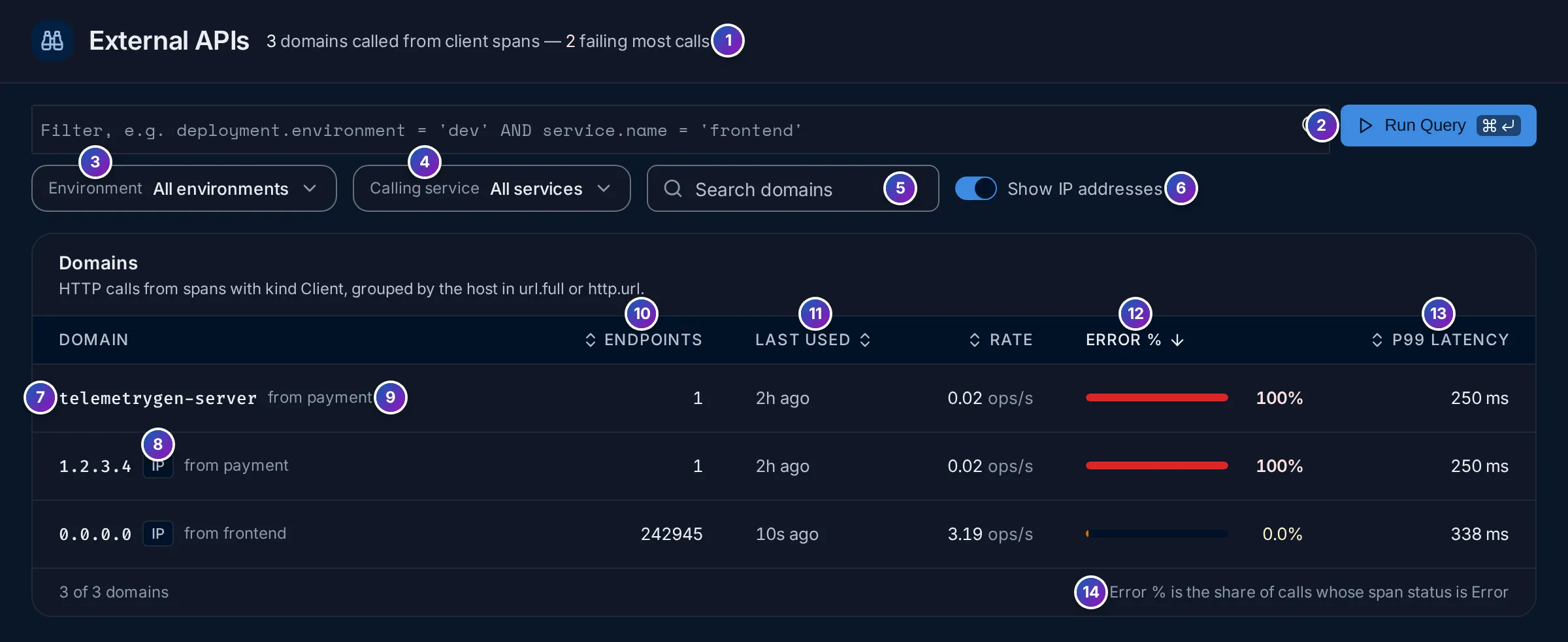
- Count line: how many domains your services called in the range and, in red,
how many fail 50% of their calls or more, such as
3 domains called from client spans — 2 failing most calls. - Filter: any span attribute, such as
deployment.environment = 'dev' AND service.name = 'frontend'. Run Query applies it. - Environment: keep calls from one
deployment.environment. - Calling service: keep calls made by one service.
- Search domains by name.
- Show IP addresses: on by default. Turn it off to hide domains that are bare IP addresses, which are often internal or misconfigured calls.
- Domain: click it to open the domain page.
- IP: the domain is an IP address, not a host name.
- from …: the services that make these calls (two names, then
+N). - Endpoints: how many different paths were called.
- Last used: when the latest call happened.
- Rate and Error %: calls per second, and the share of calls whose span status is error. The bar turns amber above 0% and red at 5% or more.
- P99 latency: 99 calls in 100 were faster than this.
- A reminder of what Error % counts. A
4xxanswer is only an error when the client instrumentation sets the span status to error for it.
Click a column title to sort; the list starts with the highest Error %.
A domain page
Section titled “A domain page”Click a domain to open it (/api-monitoring/domains/<domain>).
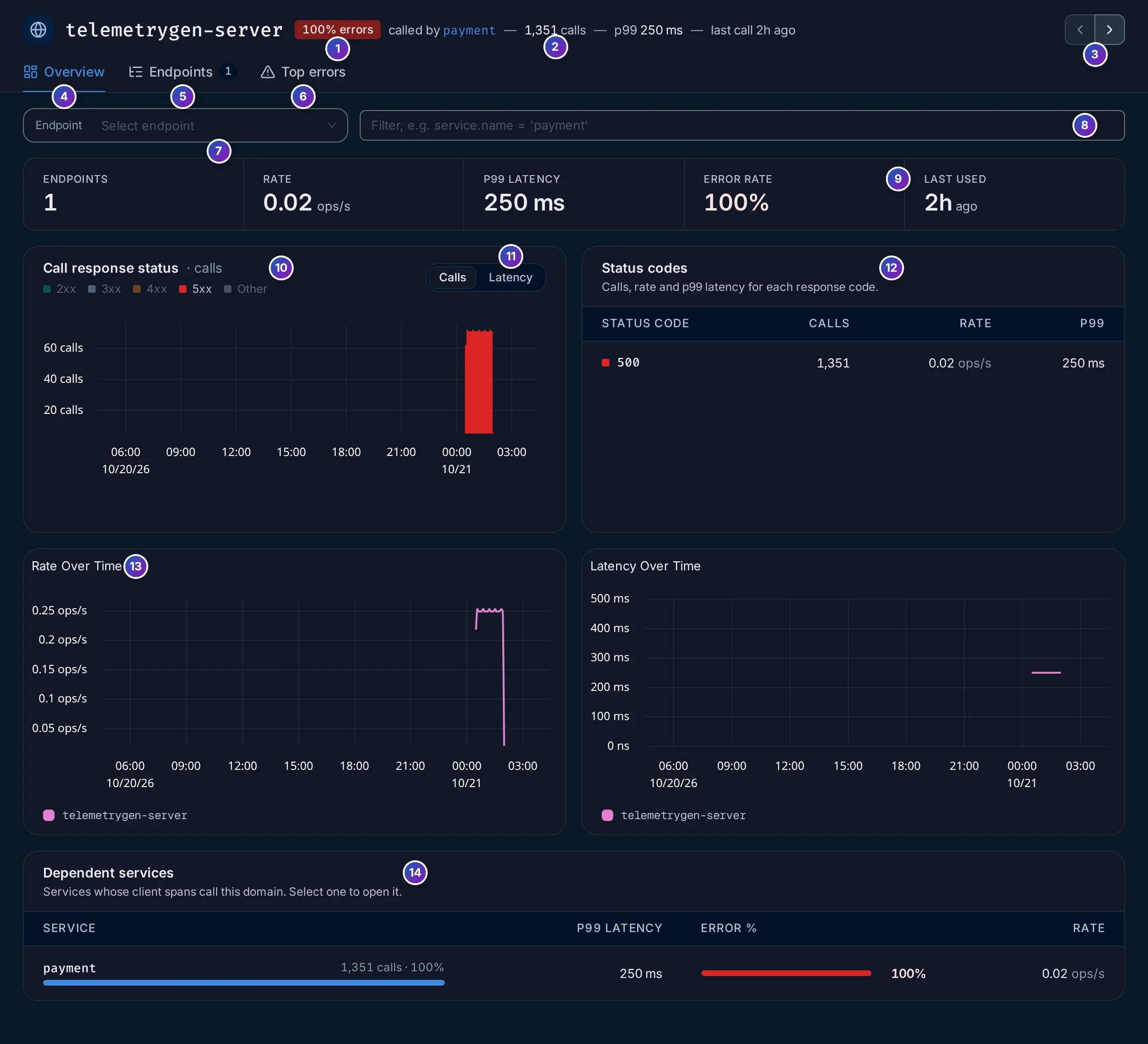
- Error badge: the domain’s error rate, red at 5% or more.
- Summary: which services call it, the number of calls, p99 latency and the last call.
- ‹ › move to the previous or next domain of the list, without going back.
- to 6. The tabs: Overview, Endpoints (with their count) and Top errors.
Overview
Section titled “Overview”- Endpoint: pick one endpoint to narrow every chart to it. The page then shows
its full URL, such as
http_url = http://telemetrygen-server:4318/lets-go, and the port. - Filter by any attribute, such as
service.name = 'payment'. - KPIs: Endpoints, Rate, P99 latency, Error rate and Last used.
- Call response status: calls over time, coloured by HTTP status class: 2xx (success), 3xx (redirects), 4xx (your request was refused, such as a bad parameter or a missing token), 5xx (the API failed) and Other.
- Calls or Latency: show the count of calls or their latency per status class.
- Status codes: calls, rate and p99 per exact code, such as
200or500. - Rate over time and Latency over time.
- Dependent services: the services that call this domain, with their share of the calls, p99 latency, error rate and rate. Click one to open its service page.
Endpoints
Section titled “Endpoints”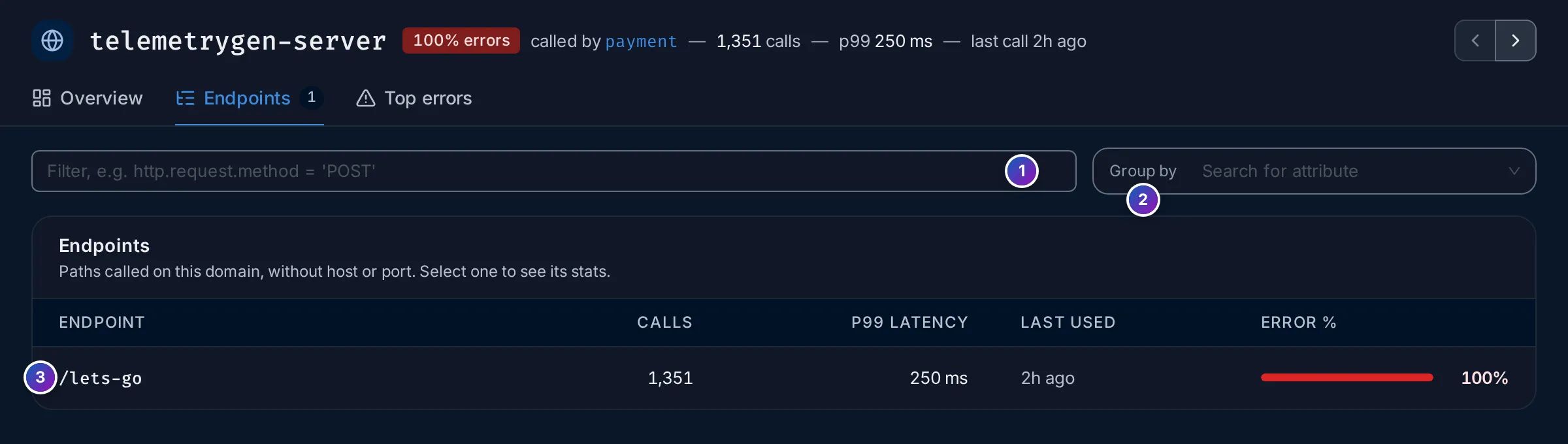
- Filter, such as
http.request.method = 'POST'. - Group by: split each endpoint by an attribute, such as
http.request.methodorservice.name. - One row per path, with Calls, P99 latency, Last used and Error %. Click a row to open the Overview for that endpoint.
Top errors
Section titled “Top errors”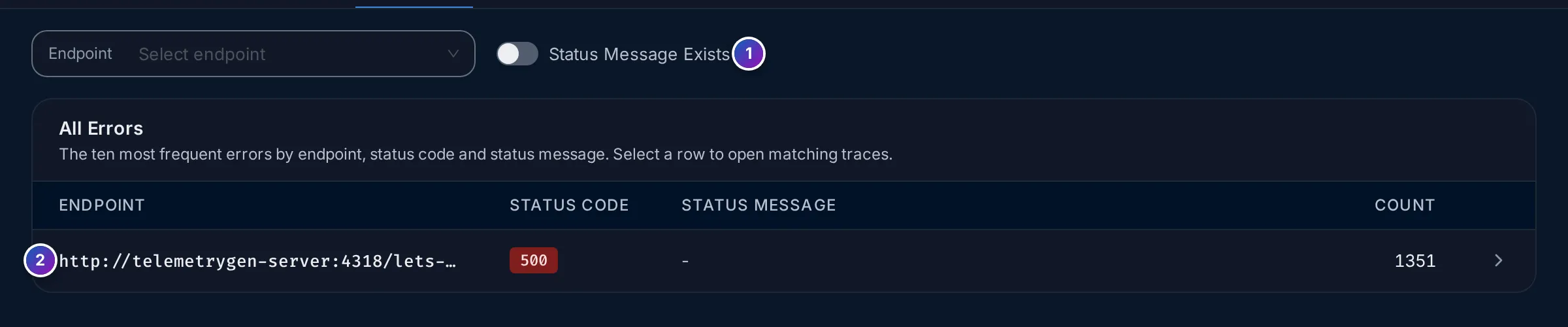
The ten most frequent failures, by Endpoint, Status code and Status message, with their Count. Click a row to open the matching spans in the Traces explorer.
- Status Message Exists is on by default, and then only errors that carry a
status message are listed. Many HTTP clients record a
500without a message; turn it off to see all errors.
When no domains appear
Section titled “When no domains appear”
Sample data: this image is a Storybook story.
No external API calls detected means no client span in the range had a URL. Check, in this order:
- Widen the time range and clear the filters. Calls may be older, or filtered out.
- Instrument the HTTP client, not only the server. Server instrumentation records
the requests your service receives. Outgoing calls need the instrumentation for
your HTTP client library, such as
requestsin Python,net/httpin Go or OkHttp in Java. Zero-code agents include most of them; see Instrument applications. - Check the attributes. Open a trace with an outgoing call in
Trace details and look at the client
span: it must have kind
Clientand an attributeurl.fullorhttp.urlwith the full URL. Spans that only haveserver.addressshow on the Service Map but not here.
Example: why does payment fail?
Section titled “Example: why does payment fail?”The Services page found
that payment fails every request and that its outgoing calls fail too. Here is the
other side. The numbers are from the HotROD demo over the last day.
-
Open the list. Open External APIs and set the range to Last 1 day. The count line reads
3 domains called from client spans — 2 failing most calls.telemetrygen-serverand1.2.3.4, bothfrom payment, are at100%errors, with a p99 of250 ms.0.0.0.0, called byfrontend, is healthy. -
Open telemetrygen-server. The header reads
100% errors,called by payment,1,351 callsandlast call 2h ago. Call response status is all red 5xx, and Status codes has a single row:500, 1,351 calls. -
Find the endpoint. Endpoints lists one path,
/lets-go, with 1,351 calls at 100% errors. -
Read the errors. In Top errors, the list is empty until you turn off Status Message Exists: the failures carry no message. Then one row appears:
http://telemetrygen-server:4318/lets-go,500, 1351 times. Click it to open those spans. -
Check who is affected. Dependent services lists only
payment, with all 1,351 calls.
What you learn: the API at telemetrygen-server:4318 answers every /lets-go
call from payment with a server error, 500. The problem is on the API’s side, and
payment is its only caller.
Related
Section titled “Related”- Services: the External tab of a service charts its calls by address.
- Service Map: external addresses as dashed nodes.
- Trace details: one call in its request.