

Source maps
Production JavaScript is minified: your files are bundled into a few files such as
app.4GMSW5AF.js, and names are shortened. A stack trace from a user’s browser then
reads kS · app.4GMSW5AF.js:2:11056, which says nothing. A source map is the file
your bundler writes next to each bundle, app.4GMSW5AF.js.map, that maps every position
back to your source: applyCoupon · src/cart/pricing.js:13:11.
Upload the maps of each release to FuseScope and the Errors tab shows original stack traces.
- Maps stay private. They are stored on the FuseScope server and never served to browsers. Build with hidden source maps so your bundles don’t point to them.
- Symbolication happens when you read an error. The stored events keep their raw stack, so uploading maps later also fixes errors you already received.
- You need a service account key with the Editor role, not the application’s public key: the public key can only send data.
Two rules to get right
Section titled “Two rules to get right”1. --release must equal version in init(). The SDK sends version as
service.version on every event. FuseScope looks up maps by that value; with any other
value the stack stays minified. Use one source for both, such as the version in
package.json:
init({ // … version: import.meta.env.VITE_APP_VERSION, // 1.8.0, also passed to --release});2. A map is matched to a bundle by its URL path. Each map is stored under the path it
would be served from. FuseScope removes .map and compares the rest with the path of
the bundle in the stack trace, ignoring the origin:
| Map uploaded as | Matches the bundle |
|---|---|
/assets/index-abc123.js.map |
https://shop.example.com/assets/index-abc123.js |
/static/app.js.map |
https://cdn.example.com/static/app.js |
The CLI names each map after its path under your
build directory, with --url-prefix in front (/ by default). If your bundles are served
from a sub-path or a CDN, pass that path: --url-prefix /static/.
When no map matches the whole path, the map that matches the most trailing segments wins,
so an app served under an extra prefix, such as /shop/assets/app.js for a map uploaded as
/assets/app.js.map, still matches. Maps that carry a debugId are uploaded with it; the
Source maps tab shows it, but matching uses the path.
Upload with the CLI
Section titled “Upload with the CLI”-
Create a key. In Settings → Service accounts, create a service account with the Editor role, such as
ci-release, and add a key to it. See Service accounts. Keep the key in your CI’s secrets. -
Build with hidden source maps, so the maps are written but the bundles don’t link to them:
vite.config.ts export default defineConfig({build: { sourcemap: 'hidden' },define: {'import.meta.env.VITE_APP_VERSION': JSON.stringify(process.env.npm_package_version),},});webpack.config.js module.exports = {devtool: 'hidden-source-map',plugins: [new DefinePlugin({ __APP_VERSION__: JSON.stringify(process.env.npm_package_version) }),],}; -
Upload after each production build, with the FuseScope URL, the application id and the key in the environment:
Terminal window export FUSESCOPE_URL=https://fusescope.example.comexport FUSESCOPE_APP=01a16431-12ca-7064-bae9-6ac64cf20a29 # the application idexport FUSESCOPE_API_KEY=… # Editor service account keynpx @fusescope/cli@next sourcemaps upload ./dist --release 1.8.0 --delete-after[1/1] 14 files, 6.2 MB uploadedUploaded to 01a16431-12ca-7064-bae9-6ac64cf20a29 · release 1.8.0 · 14 files · 6.2 MB--delete-afterremoves the.mapfiles from./distonce uploaded, so they are not deployed. -
Deploy, then open an error of that release: its stack shows Symbolicated.
FUSESCOPE_APP is the application id, not its name: it is the applicationId in your
init() snippet, and it is filled in for you in the Source maps tab and in the upload
command of an error with a missing map. Every flag, list, delete and CI examples are in
the CLI reference.
The Source maps tab
Section titled “The Source maps tab”Open an application’s Settings, then Source maps. Any role can see it; Admin and Editor can upload, delete and change retention.
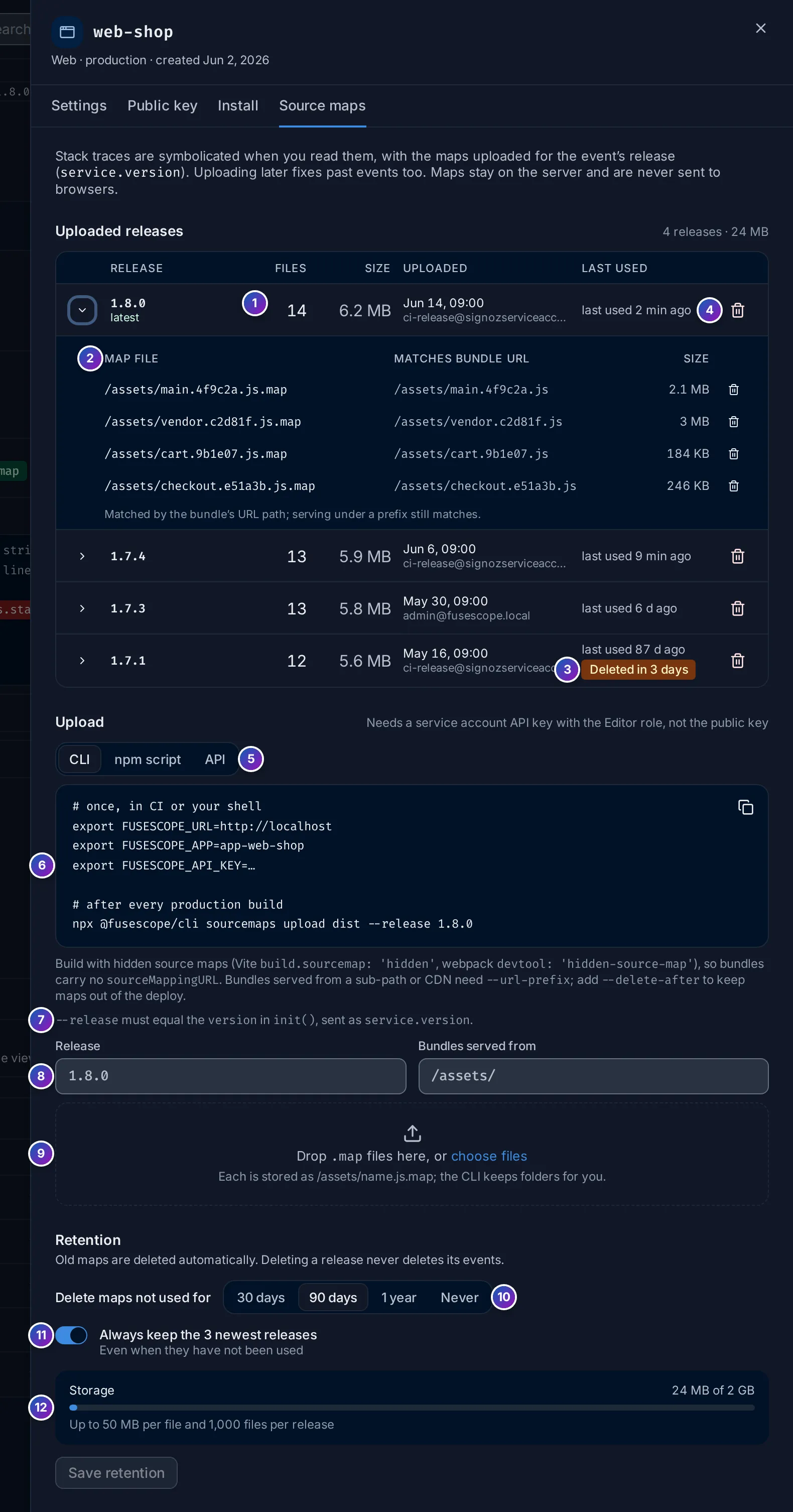
Sample data: this image is a Storybook story.
Uploaded releases
Section titled “Uploaded releases”- Release: one row per release with maps, newest upload first, with its number of Files, Size, when and by whom it was Uploaded, and when a map of it was Last used to symbolicate an error. latest marks the newest.
- Expand a release to list its files: the Map file path and the bundle URL it
Matches. Hover the bundle URL to see the
debugId, when there is one. - Deleted in 3 days: the release will be removed by the retention within a week.
- Delete removes a release’s maps (or, in the file list, one file). Its events are kept and their stacks become minified again.
Upload
Section titled “Upload”- Upload method: CLI, npm script (a
postbuildscript forpackage.json) or API (acurlcall). - The commands, with this FuseScope’s URL, the application id and the latest release filled in. Copy them into your CI.
- The reminder that
--releasemust equalversionininit(). - For a one-off fix, upload maps by hand: enter the Release and the path the
bundles are served from (
/assets/by default, as Vite builds them)… - …then drop
.js.map,.mjs.mapor.cjs.mapfiles on the zone, or click choose files. Each file is stored as the path plus its name, such as/assets/index-abc123.js.map; files in sub-folders need the CLI, which keeps folders. The result lists the files uploaded and, for each rejected file, why.
Retention
Section titled “Retention”- Delete maps not used for: 30 days, 90 days (the default), 1 year or Never. A release’s age counts from the last time one of its maps symbolicated an error, or from its upload if never used, so the maps of a release users still run are kept.
- Always keep the 3 newest releases, on by default: the 3 latest uploads are kept even when unused.
- Storage: what the application’s maps use of its quota, and the limits.
Click Save retention to apply. Deleting maps, by hand or by retention, never deletes events.
Limits
Section titled “Limits”| Limit | Default |
|---|---|
| Size of one map | 50 MB |
| Files in one release | 1,000 |
| Maps stored per application | 2 GB |
Uploading a file again under the same path replaces it. A file over a limit is rejected with the reason, and the others are still uploaded.
When a stack stays minified
Section titled “When a stack stays minified”| What you see | Check |
|---|---|
| Minified · no source map for 1.8.0 | No maps are uploaded for release 1.8.0. Compare the release in the error header with --release: 1.8.0 and v1.8.0 are different. |
| Source map missing on a group, with maps uploaded | The maps were uploaded to another application, or the upload failed. Check Uploaded releases in the application’s Source maps tab. |
| Some frames original, others minified | The map paths don’t match those bundles. Expand the release and compare Matches bundle URL with the file in the stack; fix --url-prefix. |
Frames like http://shop.example.com/:53:22 |
Code in an inline <script> of your HTML. It has no bundle, so no map. |
| The CLI exits with code 3 | The key is wrong or its service account is not Editor. |
Self-hosted FuseScope
Section titled “Self-hosted FuseScope”Maps are stored on the FuseScope backend’s disk, under /var/lib/signoz/sourcemaps. The
Helm chart keeps that directory on the backend’s persistent volume, so maps survive
restarts. The settings are under rum.sourcemaps in the
configuration file: dir, max_file_size,
max_files_per_release, quota (per application), cache_size (memory for decoded
maps), context_lines (source lines shown around a frame, 5 by default) and
cleanup_interval (how often retention runs, hourly by default).
Related
Section titled “Related”- CLI reference
- R8 mappings: the Android counterpart.
- Errors
- Service accounts