

Exceptions
Exceptions (/exceptions, under Respond in the sidebar) collects every
exception your services recorded,
across all services, and groups identical ones together. Each group shows how often it
happened and when; each occurrence has its stack trace.
Use this page when an error shows up in a service and you want to know exactly where in the code it comes from, when you want to see which errors are new, or when you are about to fix a bug and want to find every place it happens.
Exceptions in plain words
Section titled “Exceptions in plain words”- An exception is an error your program raised, such as a timeout or a refused
connection. When an OpenTelemetry SDK sees one, it records it on the current
span as an
exceptionevent with three parts: the type (java.net.SocketTimeoutException), the message (Read timed out after 2800 ms) and the stack trace. - A stack trace is the list of function calls that were running when the error happened, innermost first. It tells you which line of which file failed, and how the program got there.
- An exception group is all the occurrences with the same type, message and service. A timeout that happened 4 times is one group with 4 events.
Only errors that the code records show up here. A span can also fail with only an error status and no exception; those failures are on the service’s Errors tab as status messages.
The exceptions list
Section titled “The exceptions list”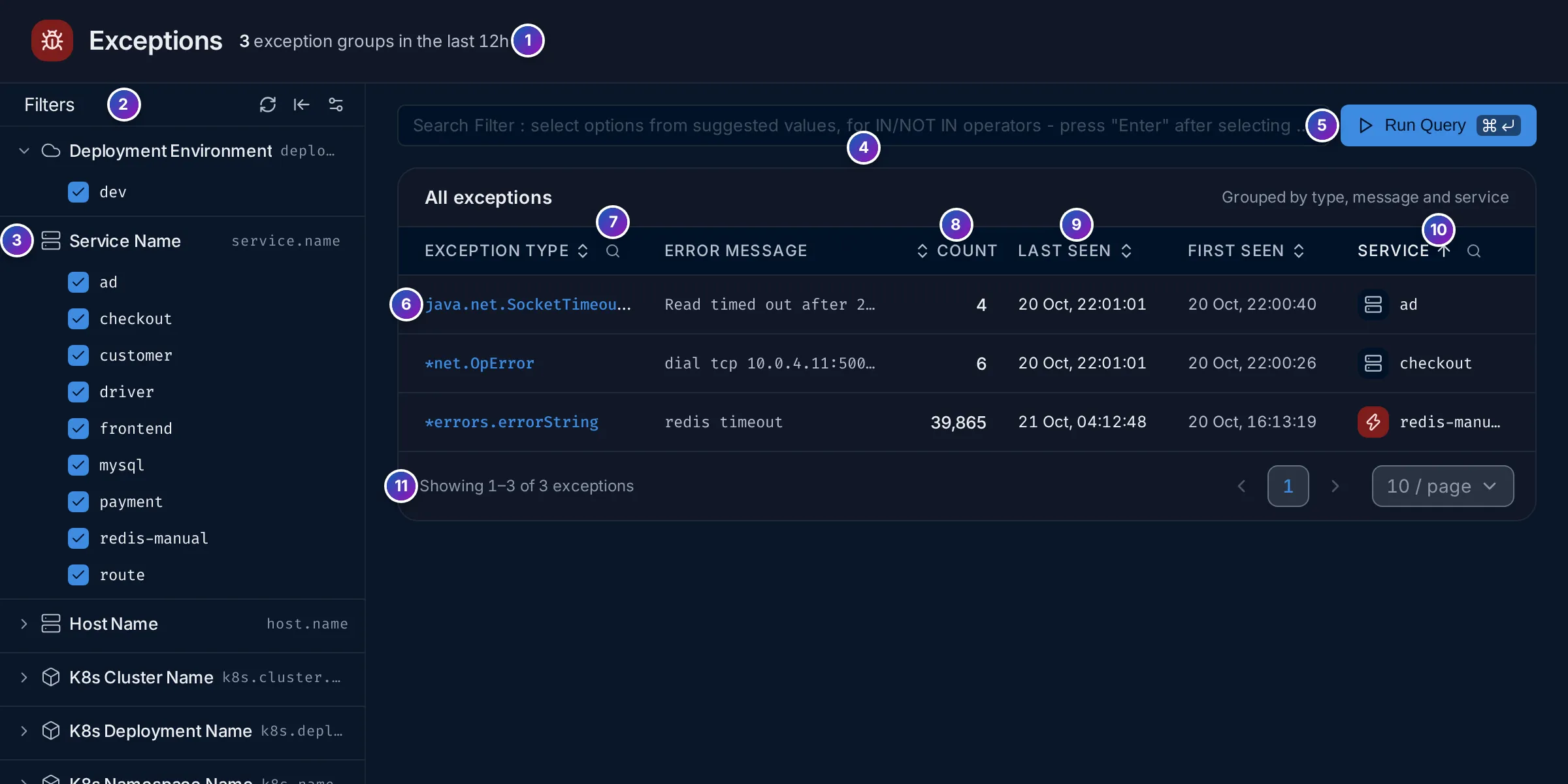
- Count line: how many groups there are in the time range, such as
3 exception groups in the last 12h. - Filters: quick filters by resource attribute. The icons reset them, fold the rail away, and choose which filters it shows.
- A filter group, such as Service Name: untick values to hide them. The other groups are Deployment Environment, Host Name and the Kubernetes cluster, deployment, namespace and pod.
- Search filter: a filter on any attribute, in the
search syntax, such as
service.name = 'checkout'. - Run Query applies it.
- Exception type: click it to open the exception’s page.
- Column search: the magnifier next to Exception type and Service filters
the table by that column, such as all
Timeouttypes. - Count: how many times it happened in the range.
- Last seen and First seen: the newest and oldest occurrence in the range. A recent First seen means a new error, often from the latest deploy.
- Service: the service that recorded it, with its type icon.
- Pager: 10 groups per page by default.
Click Exception type, Count, Last seen, First seen or Service to sort. The time range at the top applies, so widen it to find older errors.
An exception’s page
Section titled “An exception’s page”Click a group to open its newest occurrence (/error-detail?groupId=…).
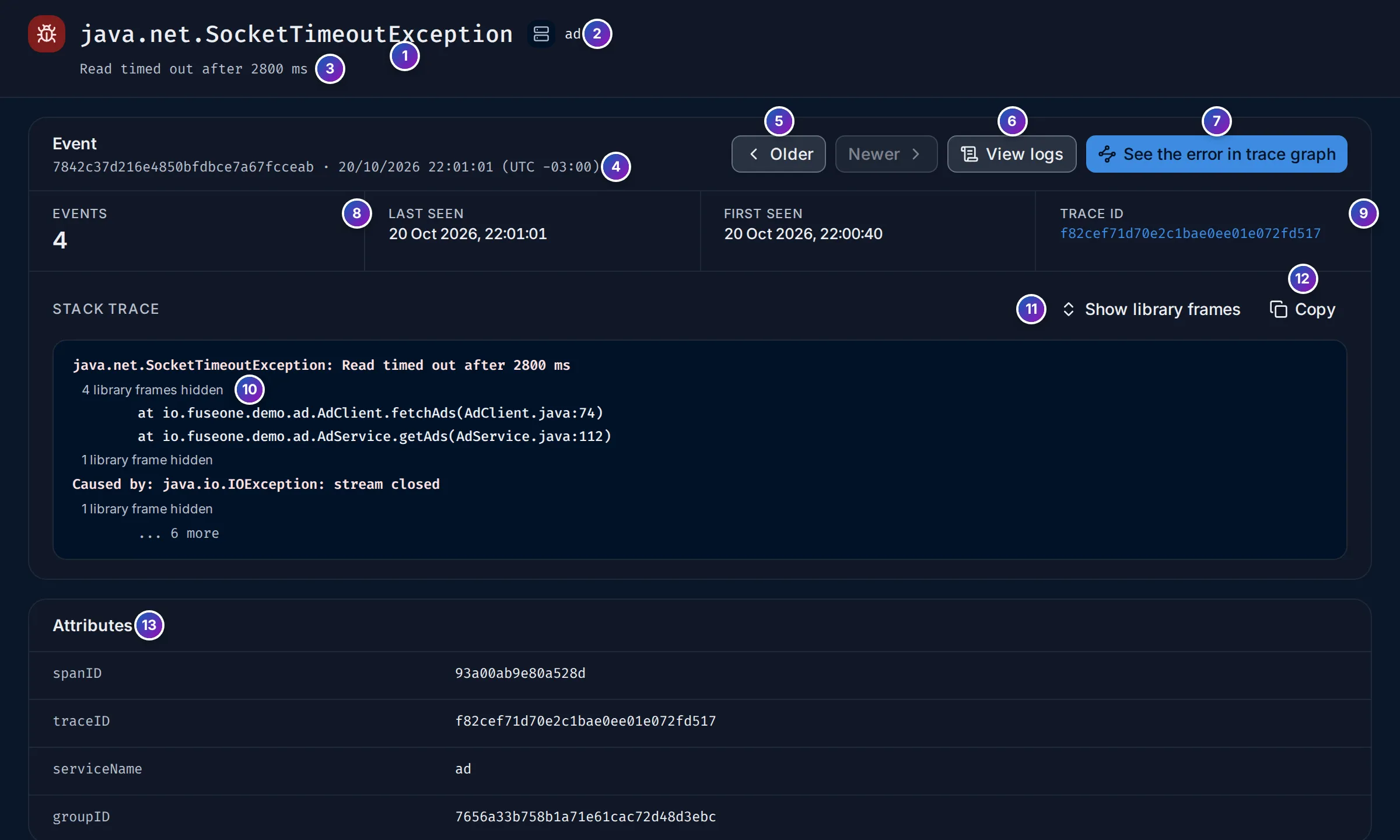
- Type of the exception.
- Service that recorded it.
- Message.
- Event: the ID of this one occurrence and when it happened.
- Older and Newer step through the other events of the group, one at a time. Newer is greyed out on the newest one.
- View logs: the logs of the same request. See View logs.
- See the error in trace graph opens the whole request in Trace details, at the span that recorded the exception.
- Events: how many times the group happened, with Last seen and First seen.
- Trace ID of this occurrence. Click it to open the trace.
- to 12. The stack trace, with Show library frames and Copy, which copies the full text.
- Attributes of the event:
spanID,traceID,serviceNameandgroupID.
Read a stack trace
Section titled “Read a stack trace”A stack trace lists the calls from the innermost (where the error was raised) to the
outermost (where the work started). In a Java trace, the first line is the exception,
then one at line per call; Caused by: starts the exception that triggered this one.
Most lines of a stack trace come from libraries and the language runtime, not from your
code. FuseScope folds runs of them into a grey line such as 4 library frames hidden,
so your own frames stand out. Show library frames unfolds them:
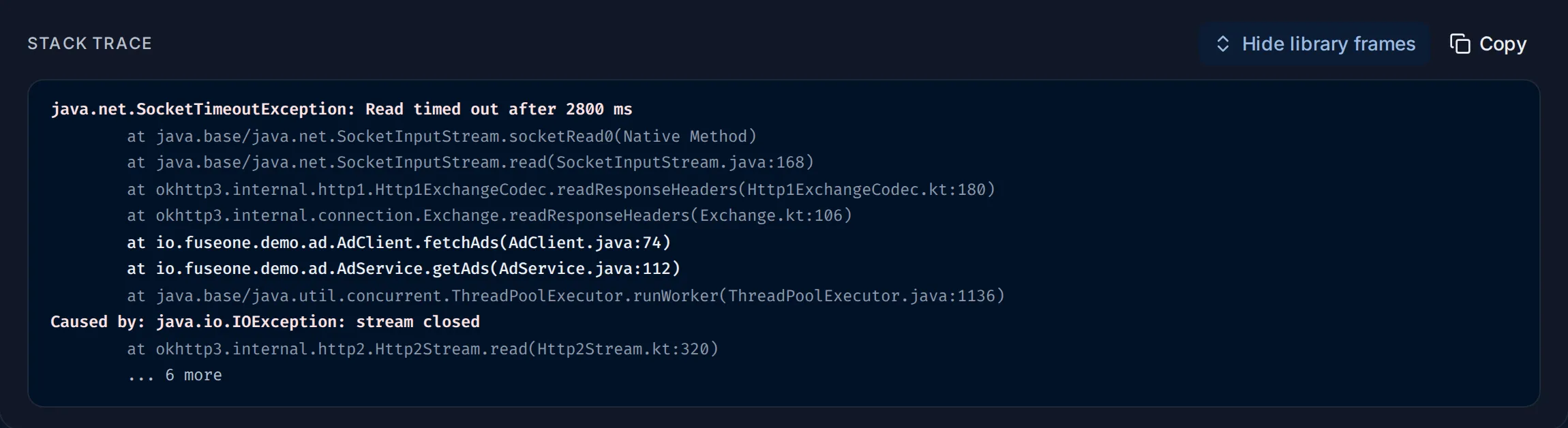
A frame counts as a library frame when:
| Language | Library when |
|---|---|
| Java, Kotlin, Scala, .NET | The class starts with a well-known library or runtime package, such as java., javax., kotlin., okhttp3., org.springframework., org.apache., io.netty., io.grpc., io.opentelemetry., com.google., System. or Microsoft. |
| Go | The function is from the standard library, or the file is under /pkg/mod/, /vendor/ or the Go installation |
| Python | The file is under site-packages, dist-packages or the Python installation |
| JavaScript | The file is under node_modules, or is a node: or internal/ module |
Everything else is your code. Start reading at the first frame of your code: it is the last place where you can change what happened.
View logs
Section titled “View logs”View logs opens the Logs explorer with
trace_id = '<trace ID>' and a time range from 15 minutes before to 15 minutes after
the event: the logs your services wrote while handling the same request. They often
say what the code was doing just before the error, such as the request parameters.
This needs logs that carry the trace ID, which happens when your logging library is
bridged to OpenTelemetry. When none do, the explorer says
No logs found for this trace. See
See the logs for one request.
Example: a timeout in the ad service
Section titled “Example: a timeout in the ad service”The demo includes test exceptions from an ad service written in Java. They are from a
few hours before the other demo data, so widen the time range.
-
Find it. Open Exceptions and set the time range to Last 12 hours. The count line reads
3 exception groups in the last 12h. Next to the steady*errors.errorString/redis timeoutofredis-manualare two short-lived ones:java.net.SocketTimeoutExceptioninad(4 times) and*net.OpErrordial tcp 10.0.4.11:50051: connect: connection refusedincheckout(6 times), both first seen at about 22:00 and gone a minute later. -
Open the timeout. Click
java.net.SocketTimeoutException. The message isRead timed out after 2800 ms, Events is4, and this event’s trace ID isf82cef71d70e2c1bae0ee01e072fd517. -
Read the stack. With library frames folded, two frames remain:
io.fuseone.demo.ad.AdClient.fetchAds(AdClient.java:74), called byAdService.getAds(AdService.java:112). SoAdClient.javaline 74 waited for a response for 2.8 seconds and gave up. TheCaused by: java.io.IOException: stream closedline says the connection was closed under it. -
Unfold the libraries. Show library frames reveals
okhttp3andjava.net.SocketInputStreamframes above line 74: the HTTP client was reading response headers. The other side didn’t answer in time. -
Look for context. View logs finds no logs for this trace in the demo: the test data has none. In your own services, this is where the request parameters and the call that timed out would show.
-
Check the other events. Click Older to step through the other three; they have the same stack, so it is one problem, not four.
What you learn: within a minute, ad timed out four times reading from an HTTP
service at AdClient.java:74, while checkout couldn’t connect to 10.0.4.11:50051.
Two services failing to reach their dependencies at the same moment points at the
network or at those dependencies, not at the code.
If something is missing
Section titled “If something is missing”- An error you expect is not listed. The code set the span status to error without recording an exception, or the error happened outside a span. Check the service’s Errors tab, which shows status-only errors.
- No stack trace. The SDK recorded the type and message only. Some languages and
frameworks need a setting to include
exception.stacktrace. - Everything is a library frame. Your code’s package looks like a library one, for
example it starts with
com.google.. Show library frames shows every frame.
Related
Section titled “Related”- Services: a service’s exceptions and status-only errors side by side.
- Trace details: the request in which the exception happened.
- Alert rules: an Exceptions-based Alert notifies you when an exception appears or grows.