

Service Map
Service Map (/service-map) draws your system as a graph: every
service is a node, and every caller and
callee pair is a line between two nodes. It is built from your
traces, so it shows how requests really
flow, not how a diagram says they should.
Use this page when you want to see how your services fit together, when several services fail at once and you want to know which one started it, or when you want to check that a new dependency, such as a database or a third-party API, is healthy.
How the map is built
Section titled “How the map is built”FuseScope draws a line from service A to service B when a span in B has its parent in
A: a client span calling a server span (CLIENT → SERVER), or a producer sending to a
consumer (PRODUCER → CONSUMER). Each line carries the numbers of those calls: the
request rate, the error rate and the latency.
Some things your services call don’t send traces themselves: a managed database, a cache, a queue or a third-party API. FuseScope still draws them, as inferred dependencies, from what the callers’ client spans say about them:
| The caller’s span has | Drawn as |
|---|---|
db.system, such as postgresql or redis |
A database or cache |
messaging.system, such as kafka |
A queue |
peer.service |
A node with that name |
server.address or net.peer.name |
An external address, such as api.example.com or 1.2.3.4 |
An inferred node is drawn with a dashed outline, and its numbers come only from its callers’ spans. See inferred dependency.
The map is layered: entry points, the services nothing else calls, sit on the left, and each step to the right is one call deeper. Requests flow from left to right.
The page, part by part
Section titled “The page, part by part”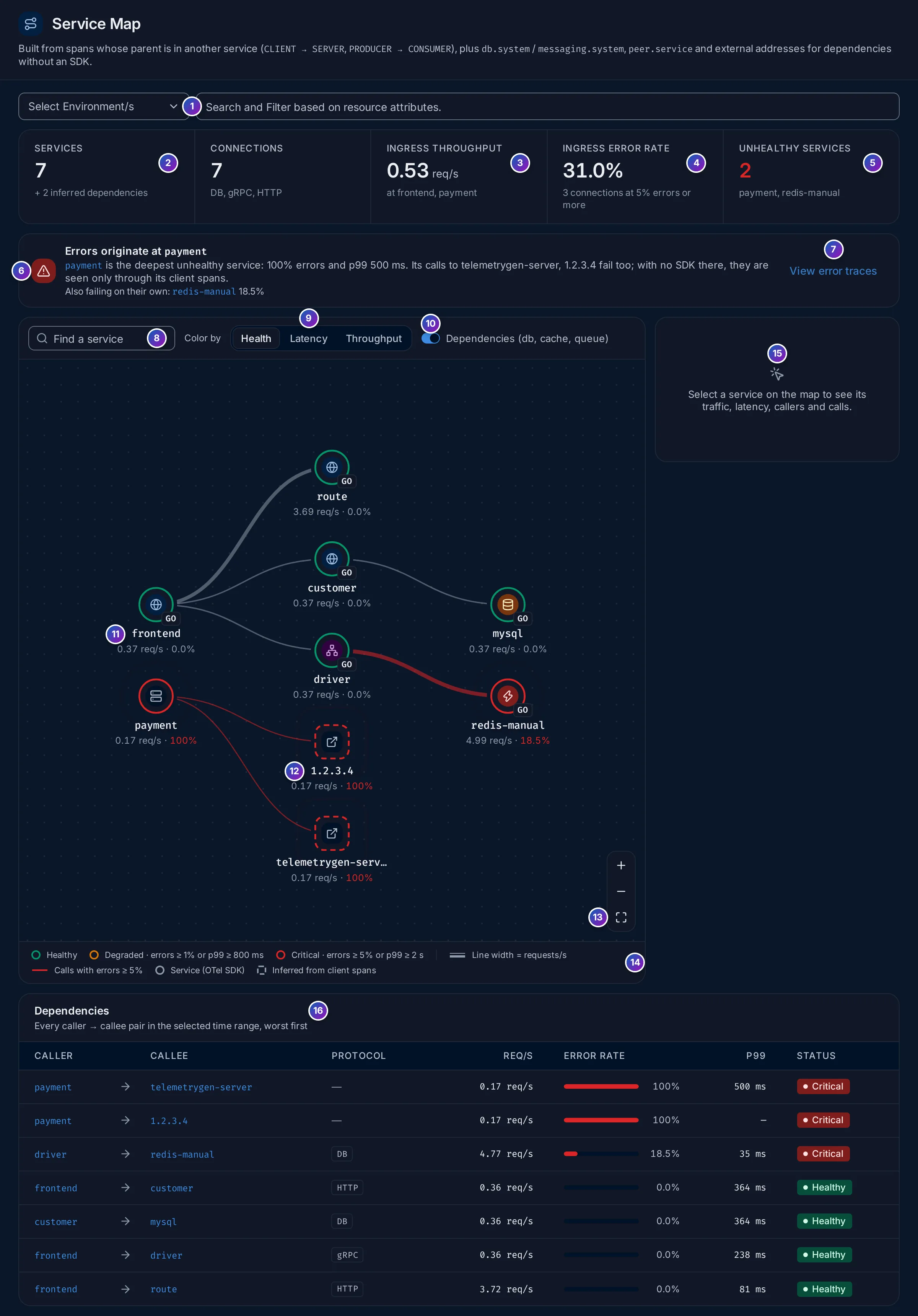
- Filters: Select Environment/s keeps the services of one or more
deployment.environmentvalues; the box next to it filters by other resource attributes. The map filters calls directly bydeployment.environment,k8s.cluster.nameandk8s.namespace.name. Other keys, such asservice.namespace, keep the services they match, with their callers and callees. - Services: how many services send traces, plus the inferred dependencies, such
as
+ 2 inferred dependencies. Connections, next to it, counts the caller and callee pairs and lists their protocols, such asDB, gRPC, HTTP. - Ingress throughput: the requests per second arriving at the entry points, and
which services those are (
at frontend, payment). This is the traffic coming into your system from outside. - Ingress error rate: the share of those incoming requests that failed. Below it, how many connections fail 5% of their calls or more.
- Unhealthy services: the services in the Critical state (see Health), by name, or None critical.
- Root-cause banner: where errors most likely start. See Root cause.
- View error traces opens the failing spans of the root-cause service in the Traces explorer.
- Find a service: type part of a name to dim every node that doesn’t match.
- Color by: Health, Latency or Throughput. See Color by.
- Dependencies (db, cache, queue): turn it off to hide databases, caches, queues and inferred nodes, and see only your own services.
- A service node. Its icon is the
service type, the badge is the SDK
language (
GO,JS,PY…), and below the name are its rate and error rate. - An inferred node, with a dashed outline: here
1.2.3.4, an external addresspaymentcalls. - Zoom in, Zoom out and Fit to screen. You can also scroll to zoom and drag to move the map.
- Legend: what the colours, line widths and outlines mean for the current Color by.
- Node panel: click a node to see its details here. See The node panel.
- Dependencies: every caller and callee pair. See The dependencies table.
Hover a line for its numbers, such as 4.68 req/s · 18.5% · p99 35 ms. Click a node
to select it: the map dims everything that isn’t its direct caller or callee.
Health
Section titled “Health”With Color by on Health (the default), each node’s outline shows its state:
| State | Colour | Rule |
|---|---|---|
| Healthy | Green | Below both thresholds |
| Degraded | Amber | Error rate 1% or more, or p99 latency 800 ms or more |
| Critical | Red | Error rate 5% or more, or p99 latency 2 s or more |
A line turns amber when 1% or more of its calls fail and red at 5% or more. Lines are wider when they carry more requests per second.
Color by
Section titled “Color by”| Color by | Node outline | Node size |
|---|---|---|
| Health | Healthy, Degraded or Critical, as above | The same for every node |
| Latency | p99 latency: green below 500 ms, amber from 500 ms, red from 2 s, grey when unknown | The same for every node |
| Throughput | Blue for every node | Larger for more requests per second |
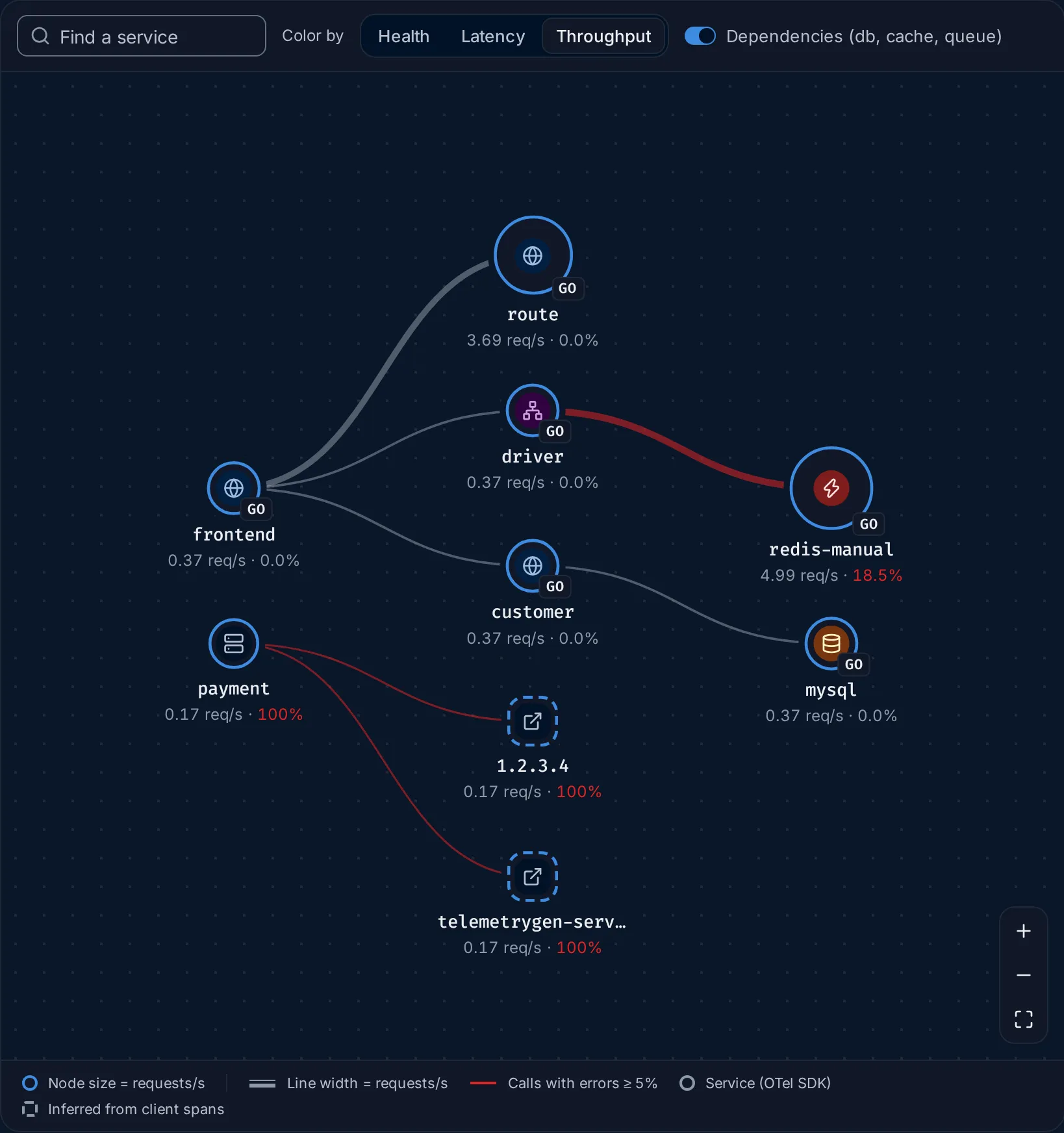
Throughput answers “where does the traffic go?”. In the demo, redis-manual
(about 5 req/s) and route (about 3.7 req/s) are the largest nodes: driver and
frontend call them many times for each request they serve. Lines with errors stay
red whatever you colour by.
Root cause
Section titled “Root cause”When several services fail at once, the one at the top of the list is rarely the one to fix: a failure deep in the system makes every service that calls it fail too. FuseScope looks for the deepest failing service with a simple rule:
A service is a likely root cause when its error rate is 5% or more and every service it calls is healthy.
Its callers fail because of it; nothing it calls explains its own errors. The banner
names it and says why, for example
payments is the deepest unhealthy service: 6.1% errors and p99 340 ms. The services it calls are healthy, so it is the likely root cause.
Some details of the rule:
- Errors spreading up: when the root cause’s callers fail too, the banner reads
Errors are propagating along checkout → payments, from the outermost failing caller to the root cause. Highlight path dims everything else on the map; Clear highlight brings it back. - Dependencies without an SDK are never named as the root cause on their own,
because FuseScope only sees them through their callers. Instead the banner names the
caller and adds that its calls to them fail too, as with
paymentand1.2.3.4in the demo. - Several independent failures: when two failing services are unrelated, the worst one is named first and the others follow under Also failing on their own.
- Circular calls: services that call each other in a loop and all fail count as one.
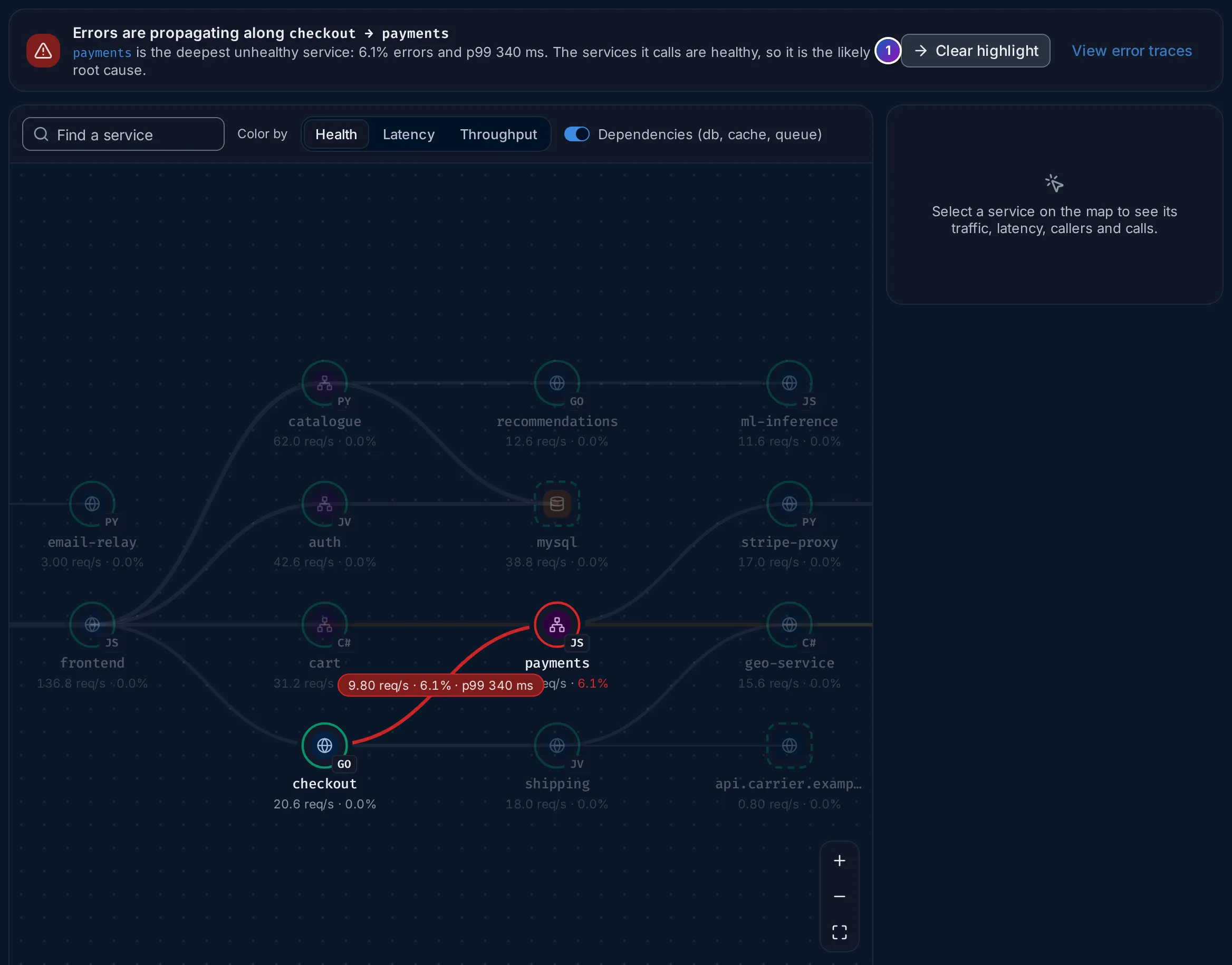
Sample data: this image is a Storybook story, not the demo.
The node panel
Section titled “The node panel”Click a service on the map, or a name in the dependencies table, to open its details on the right.
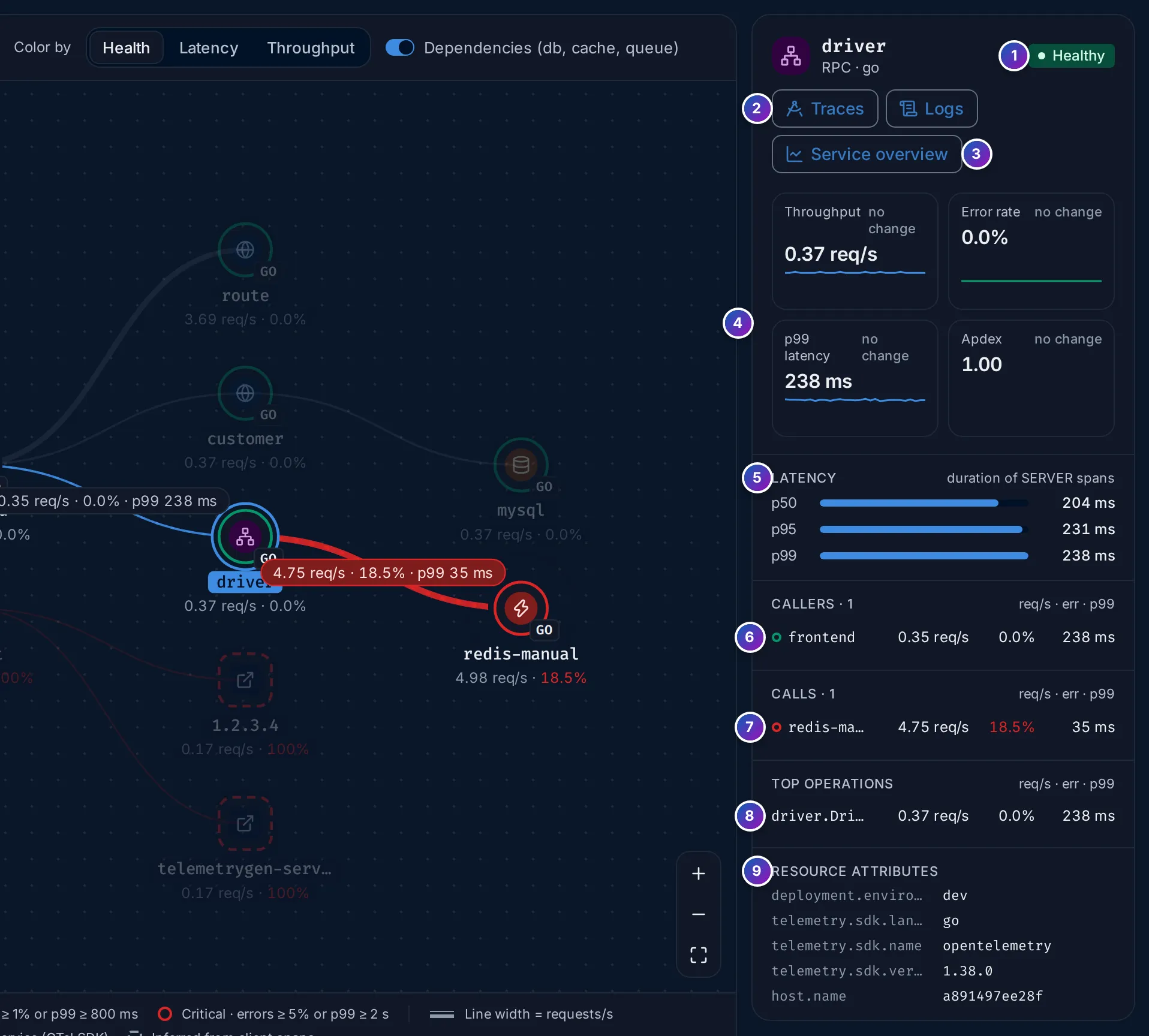
- Name, type and health:
driver,RPC · go, Healthy. - Traces and Logs open the service’s spans and logs in the explorers.
- Service overview opens its service page.
- Throughput, Error rate, p99 latency and Apdex, each with its change against the previous period and a sparkline.
- Latency: p50, p95 and p99 of the service’s own server spans.
- Callers: the services that call it, with their rate, error rate and p99.
- Calls: what it calls, the same way. Red figures mark failing calls.
- Top operations: its busiest operations.
- Resource attributes: such as
deployment.environment,host.nameand the SDK.
Click a caller or callee to move the panel to that node. An entry point says
No callers. This is an entry point.
Inferred dependencies in the panel
Section titled “Inferred dependencies in the panel”An inferred node has a shorter panel, because FuseScope only sees it from outside:
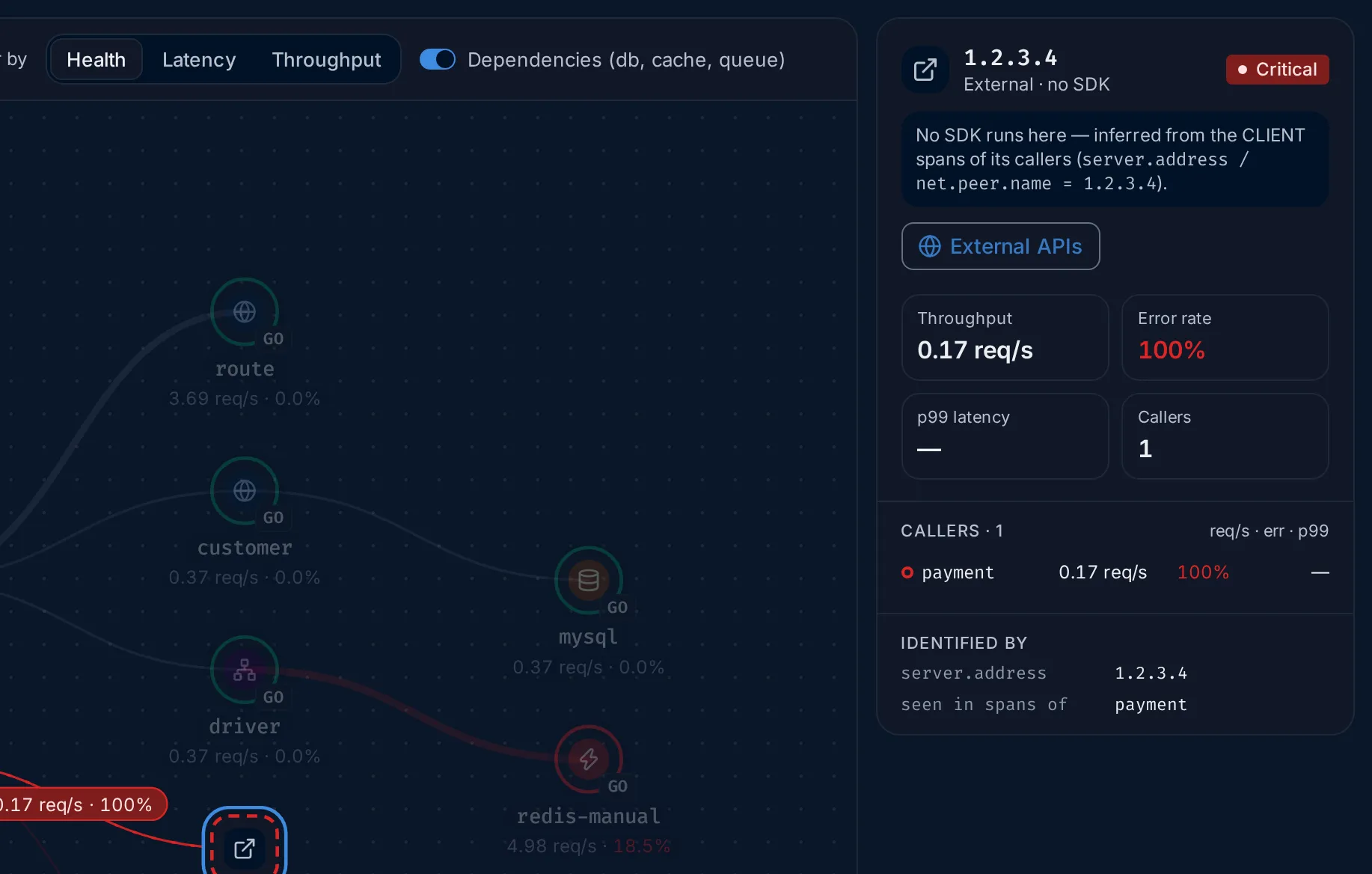
- A note says which attribute it was found by, such as
server.address. - For an external address, External APIs opens the address on the External APIs page. For a database, cache or queue, Traces from <caller> opens the caller’s spans that reach it.
- The tiles show Throughput, Error rate, p99 latency and Callers, measured on the callers’ client spans.
- Identified by lists the attribute and value, and seen in spans of lists the callers.
The dependencies table
Section titled “The dependencies table”Dependencies lists every caller and callee pair in the time range, worst first:
by error rate, then p99 latency, then traffic. Each row has Caller, Callee,
Protocol (HTTP, gRPC, RPC, DB or Messaging, or — when unknown),
Req/s, Error rate, P99 and Status (Healthy, Degraded or
Critical, with the health thresholds).
It shows the worst eight pairs; View all shows them all, Show worst 8 goes back. Click a caller or callee to select it on the map.
This table is the quickest way to answer “which calls fail?” on a large map, where lines are hard to tell apart.
Example: where do the demo’s errors start?
Section titled “Example: where do the demo’s errors start?”The numbers are from the HotROD demo over the last 30 minutes.
-
Read the KPIs. Open Service Map. Services reads
7, with+ 2 inferred dependencies. Ingress error rate is31.0%: almost one request in three that enters the system fails. Unhealthy services namespaymentandredis-manual. -
Read the banner. It says
Errors originate at payment:payment is the deepest unhealthy service: 100% errors and p99 500 ms. Its calls to telemetrygen-server, 1.2.3.4 fail too, withAlso failing on their own: redis-manual 18.5%.So there are two separate problems.
paymentfails on every request, and so do its calls to two addresses that send no traces.redis-manualfails on its own, and nobody it calls explains it. -
Check who is affected.
paymentis on the left: nothing calls it, so it is an entry point and its failures reach whoever calls it from outside. That is why the ingress error rate is so high.redis-manualis on the right, called bydriver. -
Click driver. Its panel shows Healthy with
0.0%errors, but under Calls,redis-manualis red at18.5%.drivercopes with the failures, so its users don’t see errors, only extra latency. -
Confirm in the table. Dependencies lists, worst first:
payment → telemetrygen-serverandpayment → 1.2.3.4at100%, thendriver → redis-manual(DB) at18.5%, all Critical. The other four pairs are Healthy. -
Go to the traces. Click View error traces in the banner to see
payment’s failed spans. For the cache, clickredis-manualand Service overview, then its Errors tab: the Services page follows that case.
What you learn: the demo has two unrelated failures. payment fails on every
request together with its outgoing calls, and redis-manual times out on about one
call in five, which driver absorbs.
If something is missing
Section titled “If something is missing”- A service is missing. It sent no spans in the time range, or a filter hides it. A service that calls nothing and is called by nothing still appears as a lone node.
- No lines between services. The services don’t pass trace context to each other, so their spans have no parent in the other service. Use the OpenTelemetry instrumentation for your HTTP or gRPC client and server; see Instrument applications.
- A database or API you call is missing. The client spans don’t carry
db.system,peer.serviceorserver.address. Most client instrumentations set at least one; check the attributes of the client span in Trace details. - No services in this time range. No spans arrived for the range and filters. Widen the range or clear a filter.
Related
Section titled “Related”- Services: one service at a time, with its Dependencies tab.
- External APIs: the external addresses your services call.
- Find out why a service is failing.