

Set up your first alert
Use this guide when you want FuseScope to tell you about a problem before your users do.
You will create a Slack notification channel,
then an alert rule that fires when
more than 5% of a service’s requests fail. The example watches the redis-manual
service of the HotROD demo app.
You need:
- the Admin role to create the channel, and Editor or Admin to create the rule;
- a Slack incoming webhook URL, which a Slack workspace admin creates in Slack’s app
settings. It looks like
https://hooks.slack.com/services/T000/B000/XXXX.
Part 1: create the Slack channel
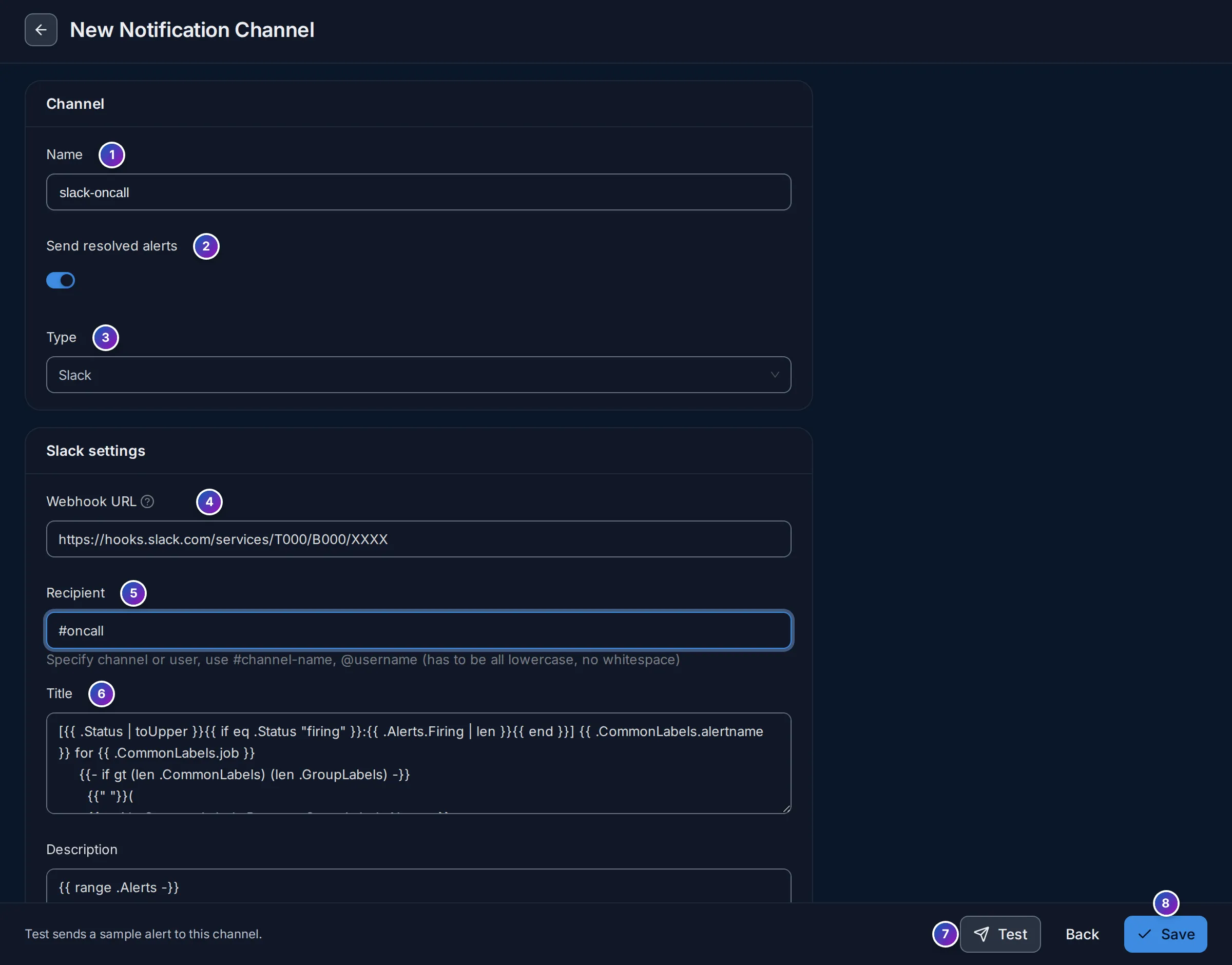
Section titled “Part 1: create the Slack channel”- Open Alerts in the sidebar and go to the Notification Channels tab. Click New Alert Channel.
- Enter a Name, such as
slack-oncall. You cannot rename it later. - Leave Send resolved alerts on, to also get a message when the problem is over.
- Keep Type as Slack. Paste the URL into Webhook URL.
- In Recipient, enter the Slack channel, such as
#oncall. - Click Test to send a test message, and check it arrives in Slack.
- Click Save.
Part 2: create the alert rule
Section titled “Part 2: create the alert rule”The error rate is errors divided by all requests. You will write it as two queries and a formula.
-
Go to the Alert Rules tab and click New Alert (New Alert Rule when there are no rules yet). Choose Trace-based Alert.
-
At the top, name the rule, such as
redis-manual error rate above 5%. -
Define the query. In query A, type the filter below. Keep the aggregation
count(): it counts all spans of the service.service.name = 'redis-manual' -
Click Add Query. In query B, count only the failed spans:
service.name = 'redis-manual' AND has_error = true -
Click Add Formula and enter
B / A * 100. This formula, F1, is the error percentage. Click Run Query and check the chart. -
Set alert conditions. Make the sentence read: Send a notification when F1 is ABOVE the threshold(s) AT LEAST ONCE during the Last 5 minutes.
-
In the
criticalthreshold row, enter5as the value and pickslack-oncallunder send to.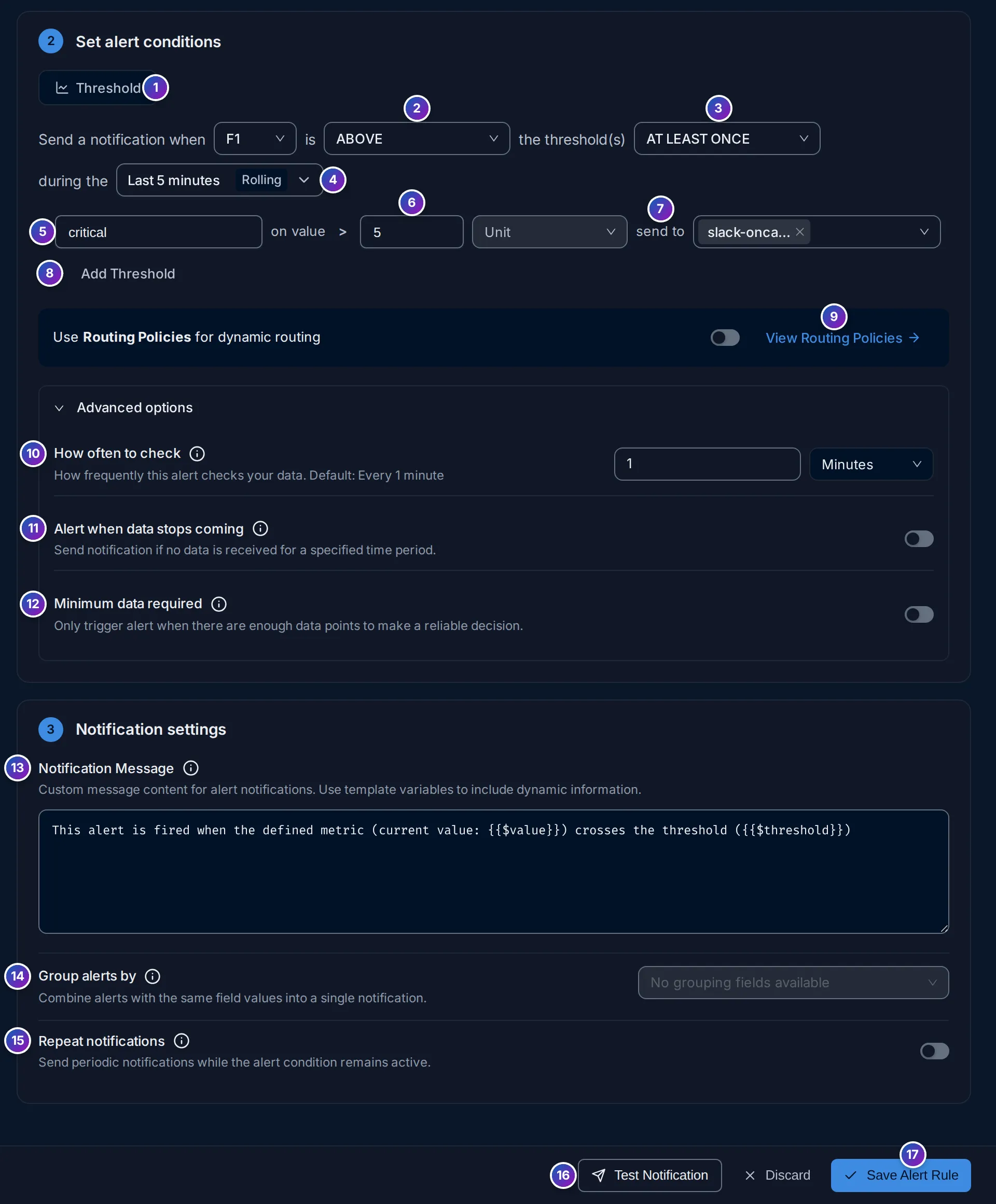
-
Notification settings. Keep the default message, or write your own, for example
{{$value}}% of redis-manual calls are failing. -
Click Save Alert Rule.
Expected result
Section titled “Expected result”The rule appears in Alert Rules with the status OK. It is checked every
minute. When more than 5% of redis-manual calls fail at any point in the last
5 minutes, its status becomes Firing and Slack gets a message with the rule name,
the value and links back to FuseScope. When the rate drops, a “resolved” message
follows.
If it doesn’t work
Section titled “If it doesn’t work”- No Slack message from Test? Check the webhook URL and that the Slack app may post to the channel.
- Links in messages point to
localhost? Set the Alertmanager external URL; see Templates. - Too many messages? Use Repeat notifications and Group alerts by in Notification settings, or silence the rule during maintenance with planned downtime.
Related
Section titled “Related”- Alert rules: every option of the rule editor.
- Notification channels: all channel types.
- Find out why a service is failing: what to do when the alert fires.